C:\ProgramData\Microsoft\Windows\Start Menu\Programs\Startup(若系統盤非 C 盤請自行調整)。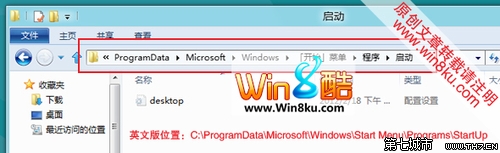
提示:也可在開始畫面右鍵桌面應用程式 → 「開啟檔案位置」快速找到開始選單資料夾。
Win8 設定數字鎖定/大小寫鎖定指示器顯示:螢幕顯示選項卡調整
Win8 微軟拼音怎麼打全形符號?Shift+Space 失效,改用第三方輸入法或臨時切換
Win8.1 IE11 無法上傳圖片到 QQ 空間?關閉保護模式與增強保護模式即可解決
Windows 8 輸入法應用體驗:內建微軟拼音 vs 第三方 (搜狗/QQ/百度/Google) 差異
Windows 7 任務列美化工具推薦:Task Color Effects、TaskBowFree、Bins
Win8 開啟/關閉 Windows 功能:Hyper-V、舊版元件與 .NET Framework 管理