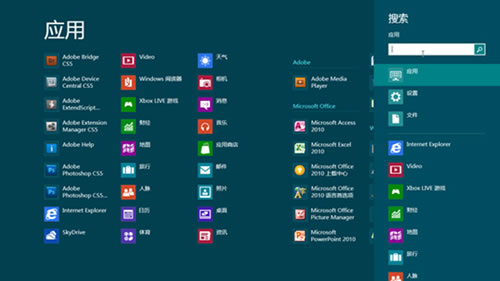
Windows 8 搜尋分為「應用程式」、「設定」、「檔案」三類入口,預設搜尋應用程式。實際上每類對應獨立熱鍵,直接呼叫對應分類,免去手動切換。
Windows 8 檔案歷程記錄:備份與還原個人檔案完整教學
Windows 8 Pre-RTM Metro UI 截圖洩漏:徹底去 Aero Glass 扁平化現代風格
升級 Win 8.1 後 C 暴增怎麼辦?磁碟清理刪除「舊版 Windows 安裝」釋放空間
Windows 8 安裝程式全新體驗:問題導向修復、多來源安裝、保留設定、線上購買下載
Win8 開啟工作管理員的 5 種方法:熱鍵、指令、右鍵選單與搜尋全掌握
Windows 8 調整系統字型大小(DPI 縮放)完整教學
Windows 8 實現登入自動撥號 ADSL:任務計劃程式設定圖文教程
Win8 玩 LOL 閃退修復:安裝 VC++ 執行階段、修復遊戲檔案、排查惡意軟體