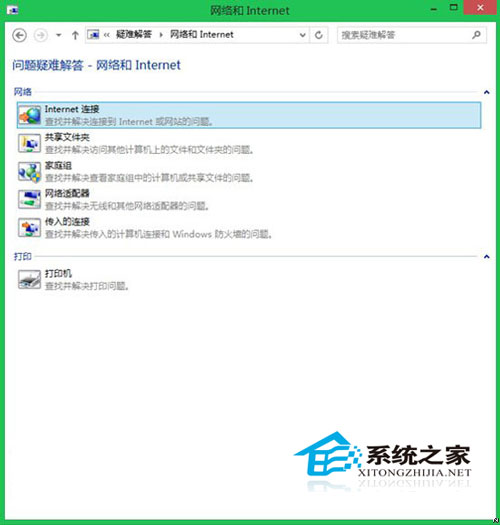
升級 Windows 8.1 後出現「無法連線到此網路」、「網路受限」錯誤,而其他裝置正常上網,通常因 Wi-Fi 加密模式不相容或 IP 取得錯誤所致。
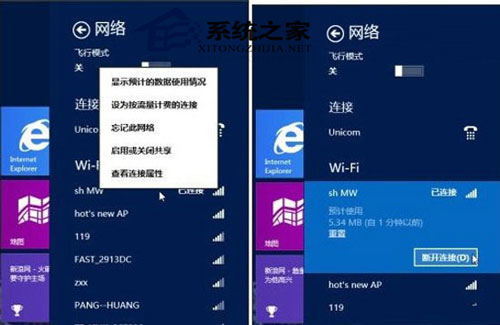
點擊「忘記此網路」移除舊設定檔 → 重新搜尋並連線輸入密碼。
(其餘三大方案包含:變更路由器加密模式為 WPA2-PSK、手動設定靜態 IP、重設 TCP/IP 堆疊與 Winsock 目錄,操作步驟請參考完整教學。)
Windows 8 更新補丁後 Modern 介面卡死雙解法:系統還原或一鍵復原
Win8 音樂應用程式新增音樂檔案教學
Win8.1 應用商店報 0X80246007 無法安裝?移動 IE11 臨時文件夾至 C 盤(同 17067)
Windows 8 開啟內建相機/攝影機完整教學:兩種方法與拍照/錄影/相簿存取技巧
Win8/8.1語音辨識功能完整教學:啟用、訓練與十大語音指令操作
Windows 8 現代版工作管理器啟用指南
Win8 設定螢幕保護程式恢復時不需輸入密碼教學
Windows 8 十大優缺點深度評測:從廣告內建到檔案傳輸增強