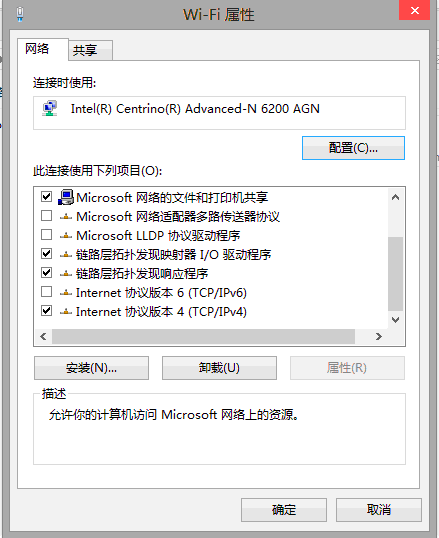
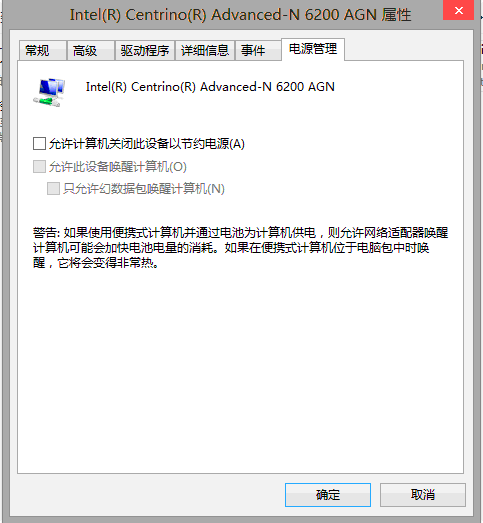
Windows 8 無線網路頻繁斷線、重連失敗,三大常見成因與對策:
依序嘗試前兩項通常即可解決多數斷線問題;若持續發生請檢查驅動程式版本或路由器設定。
Win8 開啟命令提示字元 (CMD) 兩大快速法
登錄檔揭露 Windows 8 九大版本資訊,零售版僅四款
Windows 8 天氣應用切換攝氏度 3 步驟完成
Windows 8.1 觸控鍵盤完整操作指南:模式切換、拇指鍵盤、手寫面板與輸入技巧
Win8 內建麥克風/列入輸入問題排除:硬體測試、連接檢查、音量設定三步驟
Win8 自訂介面文字大小 (DPI 縮放):100%-200%+ 自由調整與登出生效
Windows 8 一鍵清除垃圾檔案:自製 BAT 批次檔清理暫存、快取、下載、Cookie、更新備份等
Windows 8 難撼動平板格局:蘋果生態鏈強大、應用數量懸殊、廠商觀望