Windows Store 安裝應用失敗,常因 Microsoft 帳戶登入狀態異常(如清理工具移除快取導致)。兩種快速修復:
方法一:重新連結 Microsoft 帳戶
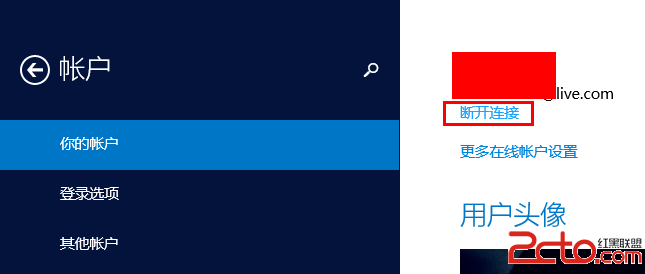
- 設定 → 帳戶 → 你的帳戶 → 「中斷 Microsoft 帳戶連結」。
- 重新登入 Microsoft 帳戶。
方法二:重設 PIN 碼 (推薦,更快)
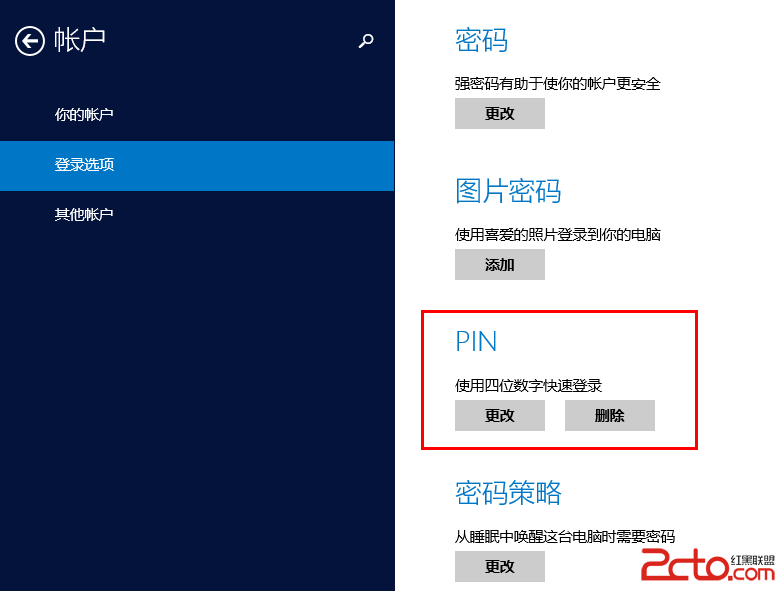
- 設定 → 帳戶 → 登入選項 → 「PIN 碼」。
- 若已設定:移除 → 重新新增;若未設定:直接新增 4 位數字 PIN。
- 原理:強制重新驗證 Microsoft 帳戶憑證。
完成後重新開啟 Store 即可正常安裝應用。