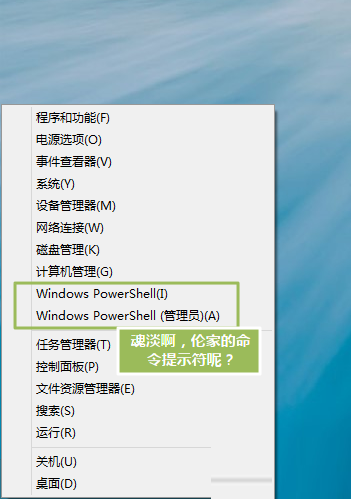
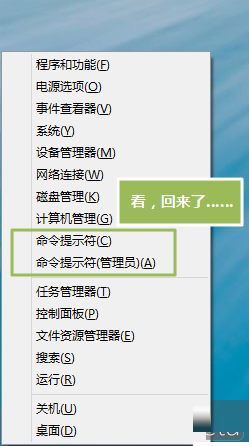
Windows 8.1 預設將 Win+X 選單(右鍵開始按鈕)中的「命令提示字元」替換為「Windows PowerShell」。若習慣使用 CMD,可透過工作列屬性輕松找回。
設定步驟
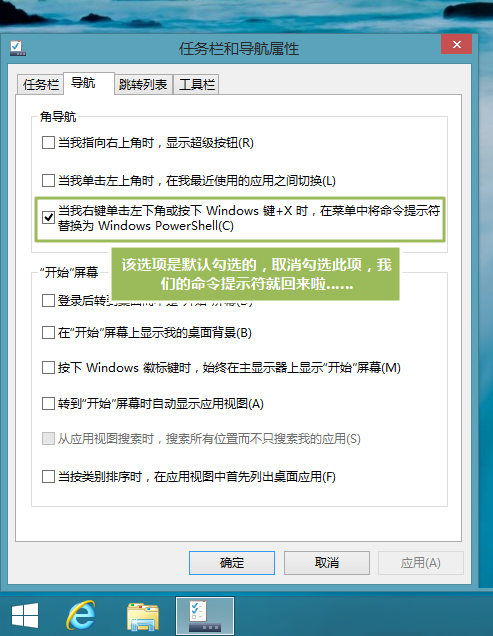
- 工作列空白處右鍵 → 「內容」。
- 切換至「導覽」索引標籤。
- 取消勾選「當我右鍵按一下左下角或按下 Windows 鍵+X 時,在功能表中以 Windows PowerShell 取代命令提示字元」。
- 確定套用,Win+X 選單即恢復顯示「命令提示字元」與「命令提示字元 (系統管理員)」。
額外發現
同一視窗還可設定:
- 「登入時直接進入桌面而非開始畫面」。
- 「開始畫面顯示桌面背景圖片」。
- 「啟用滑鼠鍵盤操作優化」(Modern 應用關閉手勢等)。
PowerShell vs CMD
- PowerShell 為進階自動化殼層,支援 .NET 物件管線、腳本語言,功能超集 CMD。
- 大多數傳統 CMD 指令在 PowerShell 可直接執行(含批次檔 .bat/.cmd)。
- 若僅需執行
ipconfig、ping、sfc /scannow 等常用指令,CMD 體驗更輕量、啟動更快。