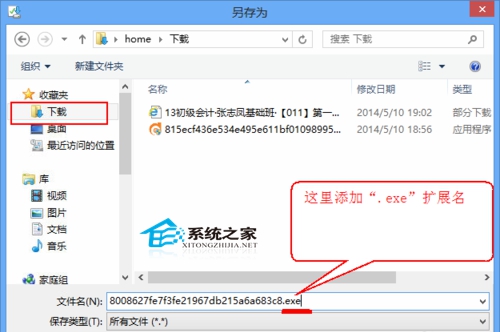
IE 下載 exe 課件直接點擊無法運行,提示不安全。
.exe
Windows 8.1 無法識別 USB 裝置解決教學:重啟 Plug and Play 服務與重裝驅動
Windows 8 檔案歷程記錄備份重要檔案完整教學:外接硬碟/網路位置、排除資料夾、還原個人檔案、時光機功能
將 QQ/搜狗/Google 拼音詞庫匯入 Windows 8 微軟拼音輸入法:匯出 → 深藍轉 TXT → 自造詞工具匯入三步驟
Windows 8 Metro 界面启用“以其他用户身份运行”功能
Win8 善用內建壓縮/解壓縮工具
Windows 8 開發者預覽版預設啟用遙測回報:收集硬體與使用資料
修復 Windows 7/8 雙系統開機選單:BCD 修復與快速啟動關閉全攻略
預裝 Windows 8 中文版電腦升級/重裝專業版:ei.cfg 破解安裝映像版本鎖定