Office 2003/2007 的「稿紙增益集」在 Windows 8 中常無法透過控制台正常卸載。刪除對應的 Windows Installer 註冊表產品代碼,可強制清除殘留項目。
regedit。HKEY_CURRENT_USER\Software\Microsoft\Installer\Products{0762812C-5FEE-C1B4-28F2-6679F2DFAE7C} (即 0762812C5FEEC1B428F26679F2DFAE7C 去除連字號格式)。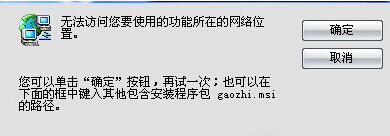
此法適用於各類無法透過標準方式卸載的 MSI 安裝程式殘留項目。
Windows 8 安裝僅需 8 分鐘?8 核心 24GB 記憶體測試機實測
Win8 虛擬鍵盤隱藏彩蛋:長按符號鍵彈出豐富特殊字元,WP8 同步擁有
Windows 8 藍牙裝置無法移除:服務管理啟用 Bluetooth Handsfree Service 與 Bluetooth Support Service
Windows 8 檔案總管在哪裡?三種快速開啟方法圖文教學
Win8 系統網路受限或無連線?CMD 指令快速修復 TCP/IP 設定
Windows 8 建立 VHD 虛擬硬碟完整圖文教學:磁碟管理工具操作步驟
Windows 8 VPN 設定兩步驟:網路和共用中心 → 連線到工作區 → 使用網際網路連線 (VPN) 輸入伺服器位址建立