Windows XP Windows 7 Windows 2003 Windows Vista Windows 綜合教學 Linux 系統教學
Windows 10 Windows 8 Windows 2008 Windows NT Windows Server 電腦軟體教學

Win8 系統網路受限或無連線?CMD 指令快速修復 TCP/IP 設定

編輯:Windows 8 系統介紹

重裝 Win8 後常出現「網路受限」或「無網際網路存取」提示,導致無法上網。此問題多因 TCP/IP 參數異常,透過管理員命令提示字元執行三條 netsh 指令即可重置網路堆疊,快速恢復連線。

修復步驟

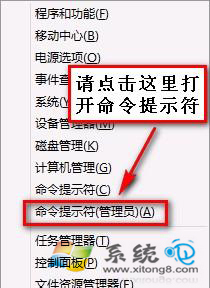
  1. 按 Win + X 選擇「命令提示字元 (系統管理員)」。
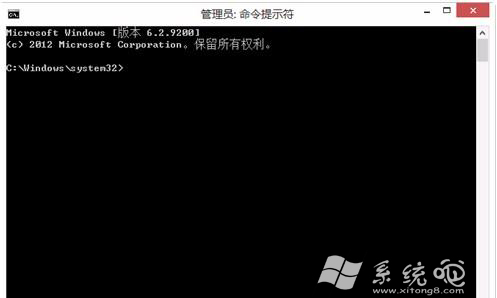
  2. 依序輸入以下指令,每行按 Enter:
    netsh int tcp set heuristics disabled
    netsh int tcp set global autotuninglevel=disabled
    netsh int tcp set global rss=enabled
  3. 關閉視窗並重新開機,再次連線即可正常上網。

管理員命令提示字元

指令執行畫面

同樣適用於有線/無線網路受限、無連線等情況,若問題持續請檢查驅動程式或路由器設定。

Copyright © Windows教程網 All Rights Reserved