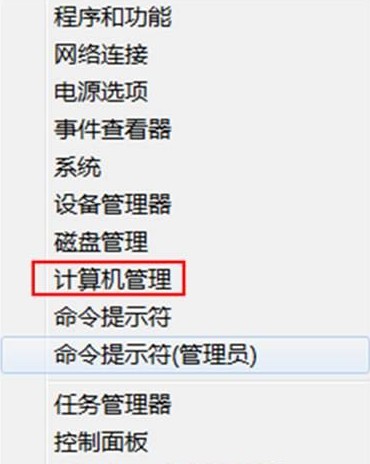
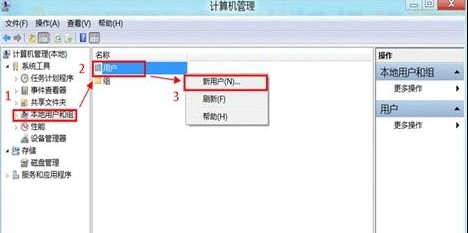
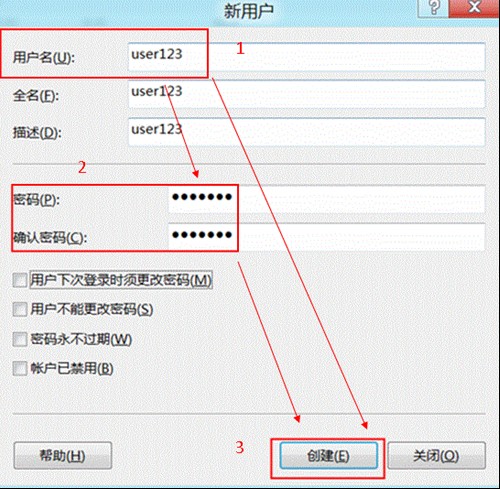
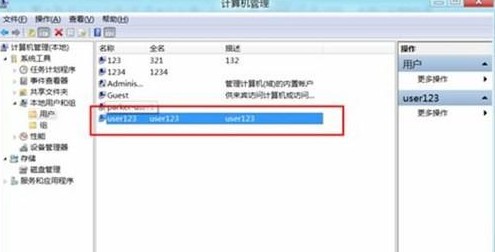
Windows 8 透過「電腦管理」建立本地帳戶,適用於不想使用 Microsoft 帳戶的情境:
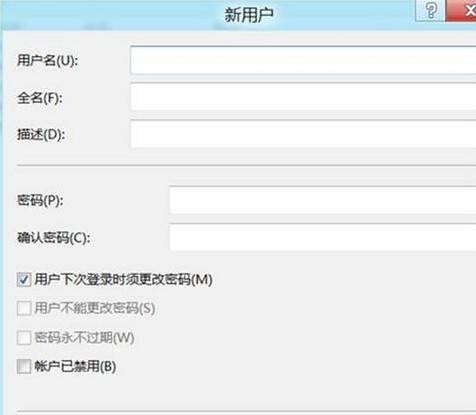
進階設定:雙擊帳戶可設定「使用者下次登入時必須變更密碼」、「密碼永不過期」、「帳戶已停用」等屬性。新建帳戶預設為標準使用者,如需管理員權限,請加入「Administrators」群組。
Windows 8 指派存取權 (Assigned Access) 設定教學:限制帳號僅能使用單一應用程式
Windows 8 Ribbon 介面深度分析:可摺疊、情境感知、可定制、提升可用性
Windows 8 系統啟用狀態快速查驗:兩種官方方法圖文教學
Windows 8 觸控操作完整圖表:手勢、鍵盤模式、邊緣滑動、選取/縮放/旋轉一覽無遺
Win8 記事本無法開啟 .txt 檔案?修復檔案關聯恢復預設開啟方式
Windows 8 開關機技術深度解析:混合啟動、快速啟動與休眠機制
Win8.1 設定睡眠喚醒密碼,平衡安全與便利性
Win8 啟用 Hybrid Boot 快速啟動:電源選項勾選「啟用快速啟動」秒開機