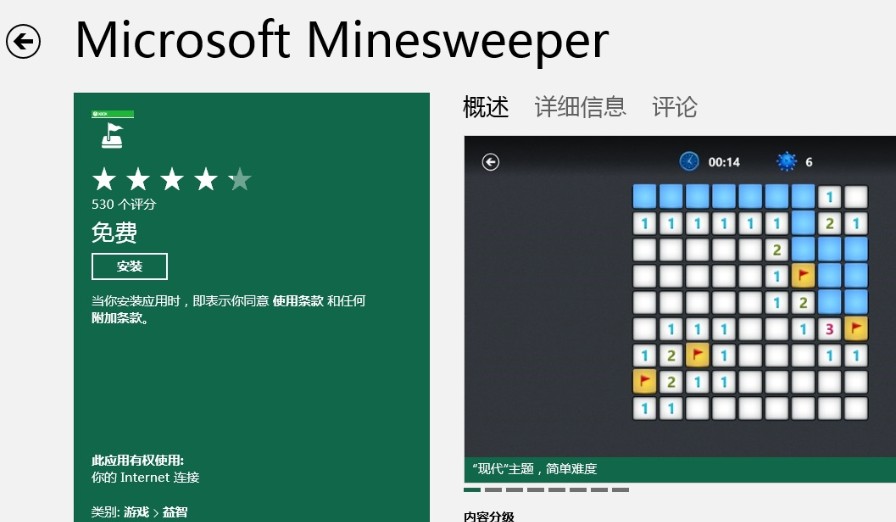
Windows 8 移除預裝的傳統掃雷遊戲,使用者在開始畫面或「所有程式」中找不到 winmine.exe。
winmine.exe
自 Windows 3.1 以來內建的掃雷,在 Windows 8 改為透過 Windows Store 提供 Metro 版本,不再佔用系統映像空間。
同樣適用於 Windows 8.1、Windows 10 及更新版本。若偏好傳統桌面版介面,可尋找第三方移植版,但官方版本相容性與安全性最佳。
分析師看好 Windows 8 應用商店 年營收可望破 10 億美元
微軟 BUILD 大會即將發布 Windows 8 Build 8100?多方猜測版本號
Windows 8 設定工作列自動隱藏圖文教學
Win8 開啟 ISO 檔案兩大法:原生掛載與壓縮軟體解壓
Windows 8.1 (Blue) Build 9369 安裝全過程圖賞
如何用產品金鑰升級 Windows 8?中文版陷阱與英文版破解法
Win8 找不到「本地連接」?四步快速定位網路適配器設置
Windows 8 筆電省電完整指南:電源計畫、螢幕亮度、睡眠時間、裝置管理五大關鍵設定