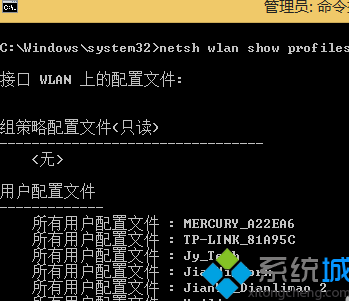
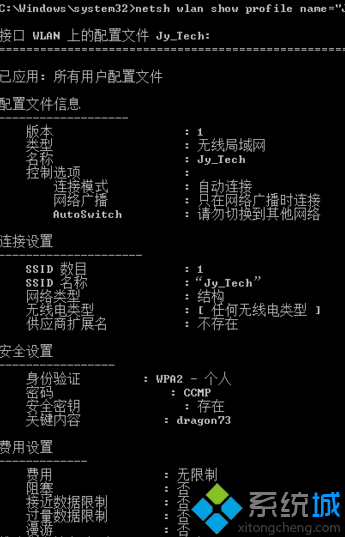
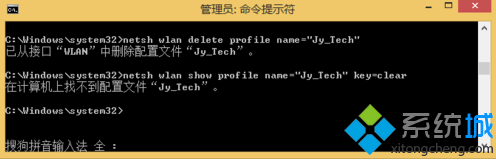
命令提示字元 (管理員) 下使用 netsh wlan 指令集,可快速列出所有記憶的 Wi-Fi 設定檔、查看明文密碼、刪除不需的設定檔,比 GUI 介面更高效。
netsh wlan
netsh wlan show profiles
netsh wlan show profile name="SSID名稱" key=clear
netsh wlan delete profile name="SSID名稱"
此法適用於 Windows 8/8.1/10/11,系統管理員權限為必要條件。
Windows 8 六大隱藏功能盤點:迷你開始選單、檔案歷程記錄、同步設定等
Windows 8 右下角系統圖示模糊?調整 DPI 縮放至 100% 即可恢復銳利
Win8.1 取消開機密碼完整教學:自動登入與註冊表兩大法
微軟官方確認:Windows 8 將內建應用程式商店,App Store 團隊已組建
Windows 8 使用「優化磁碟機」磁碟碎片整理與排程設定圖文教學
Windows 8 進入安全模式完整指南:兩大官方方法圖解
Win 8 行動中心「簡報設定」一鍵優化:投影片演示不再被打擾
Windows 8 預覽版安裝、驅動與使用技巧完整分享