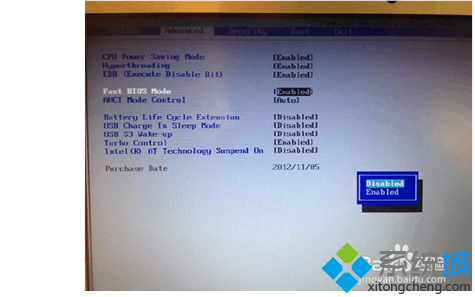
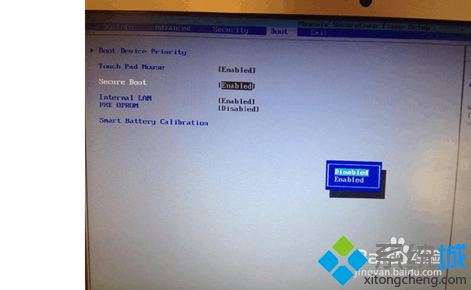
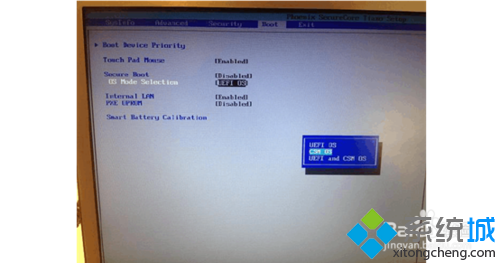
Windows 8 預設的 UEFI 安全開機與快速開機機制,阻擋了傳統 USB PE 的啟動。必須在 BIOS 中調整三項關鍵設定,才能順利從 USB 進入 PE 環境。
Disabled
重啟後按開機熱鍵選擇 USB 即可進入 PE。作業完成後,務必進 BIOS 恢復預設值,確保 Windows 8 正常啟動。
Win8.1 解決 Wi-Fi 連線受限/無法連接問題
Win 8.1 新增無線印表機報錯 0x0000057?兩招輕鬆搞定
惠普、戴爾等大廠規劃 2012 Q3 推出 Windows 8 平板
Windows 8 ReadyBoost 使用教學:USB 隨身碟當作快取加速、專用/共用模式、空間設定、取消方法
Windows 8 Metro 應用唯一發布管道為 Windows Store:微軟抽成 30% 仿蘋果模式
Windows 8 尋找與安裝硬體驅動程式完整指南
Windows 8.1 「這台電腦」移除 6 大預設資料夾 (下載/桌面/文件/圖片/音樂/影片) 登錄法
Win8 網頁圖片顯示紅叉無法載入?IE 重設與清除快取徹底修復