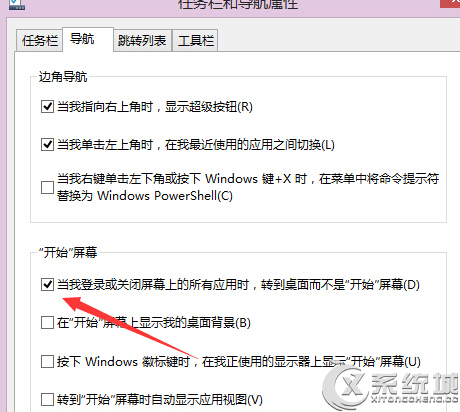
Win 8 開機直接進傳統桌面:
重開機後即直接進入熟悉的傳統桌面,適合不習慣 Metro 介面的用戶。
Win8 找回開始按鈕多方案總結:Charms 列、Win+X、原生工具列、第三方工具
Win 7 硬碟圖示無法顯示?快速修復圖示快取與 autorun.inf 完整指南
Windows 8 三種安裝方式優劣分析:覆蓋安裝、雙系統、虛擬機該怎麼選?
Windows 8.1 Update 1 新功能上手體驗
微軟發布基於 Windows 8 的嵌入式系統:跨裝置通用、完整應用相容、節能、支援 ARM、2012 下半年釋出
惠普年底前推 Windows 8 平板:主打安全與辦公、不懼 iPad 競爭
Win8 無法設定靜態 IP?教你重新安裝 TCP/IPv4 協定解決
Win8.1 Update隱藏/顯示開始畫面電源按鈕:登錄一鍵切換.reg檔案