Windows XP Windows 7 Windows 2003 Windows Vista Windows 綜合教學 Linux 系統教學
Windows 10 Windows 8 Windows 2008 Windows NT Windows Server 電腦軟體教學

大容量記憶體效能優化:登錄檔三大鍵值調整釋放效能

編輯:Win7 系統基礎知識

升級大容量記憶體(如 4GB 雙通道)後,初期體驗提升明顯,久了感覺變慢?透過登錄檔調整三大鍵值可釋放記憶體潛能,配合 CPU 快取優化。

登錄檔調整三鍵值

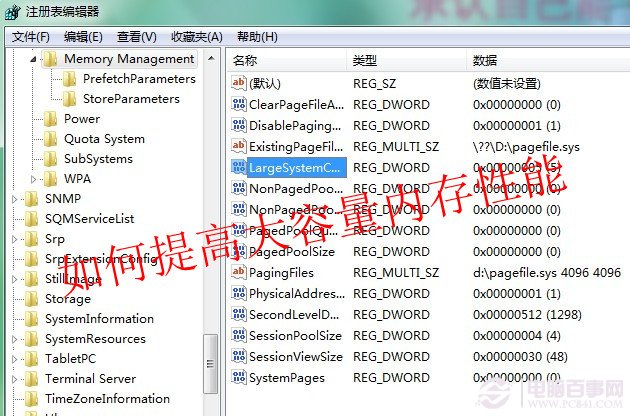
  1. 開啟 regedit,定位 HKEY_LOCAL_MACHINE\System\CurrentControlSet\Control\Session Manager\Memory Management。
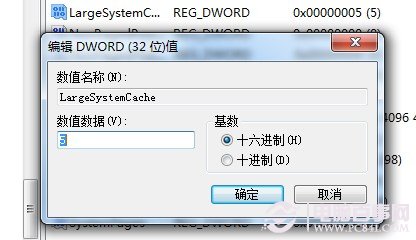
  2. LargeSystemCache(大型系統快取):預設 0(關閉),改為 1 啟用,系統快取從 4MB 擴大至 8MB。記憶體充裕可設更高(如 5)。


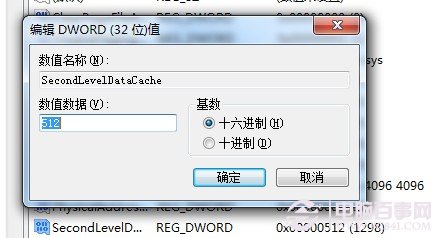
  3. SecondLevelDataCache(CPU 二級快取):預設 0(256KB),改為實際 CPU L2 快取大小(如 512 代表 512KB),提升 CPU 資料預讀命中率。

  4. DisablePagingExecutive(停用分頁執行體):設為 1 強制核心程式碼/驅動常駐實體記憶體,相當於關閉虛擬記憶體對核心的分頁,記憶體夠大時效能提升明顯。
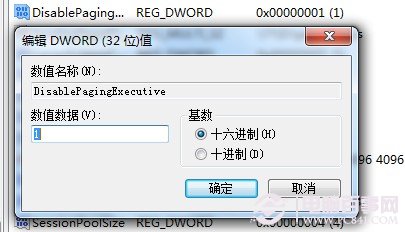
修改完成重開機生效。進階玩家可嘗試 RAMDisk Plus 等虛擬磁碟軟體進一步極致優化。

Copyright © Windows教程網 All Rights Reserved