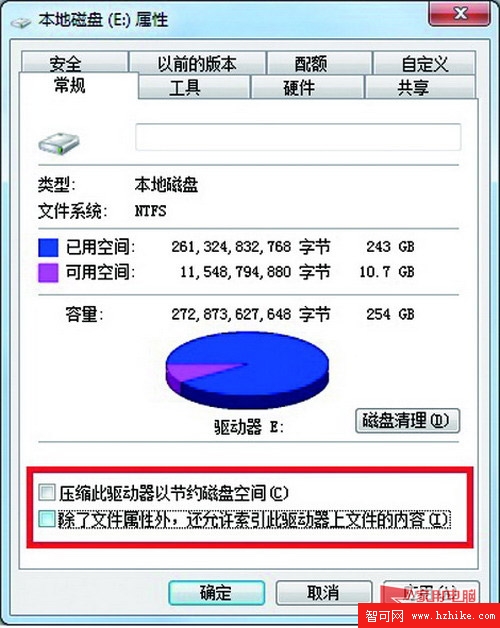
針對非系統碟(D、E、F 等資料碟),建議關閉「壓縮磁碟節省空間」與「允許索引檔案內容」:
壓縮省空間效果有限,索引雖加快搜尋但導致頻繁硬碟讀寫。系統碟建議保留預設。此舉能有效減輕硬碟負擔,讓硬碟燈不再狂閃。
Windows 7 BitLocker To Go 分步加密隨身碟:管理員三步驟完成
善用 Windows 7 群組原則提升系統安全性:隱藏/禁止磁碟機存取、禁用移動裝置執行權限、鎖定 IE 首頁與設定、軟體限制原則封鎖危險檔案與特定程式
Windows 7 靜音加速法:關閉系統聲音方案,釋放音訊處理資源,老舊電腦效果明顯
Win7 提示「虛擬記憶體不足」但設定正常?全方位排查與優化指南
Windows 7 取得 SYSTEM 權限命令列刪除頑固檔案技巧
Win7 桌面圖示盾牌圖示 (UAC) 移除教學:關閉使用者帳戶控制通知
Windows 7 系統還原點在哪?建立與使用還原點完整圖文教學
Windows 7 新功能深度體驗:Win RE 修復、遠程桌面增強、磁碟整理、系統還原與問題步驟記錄器