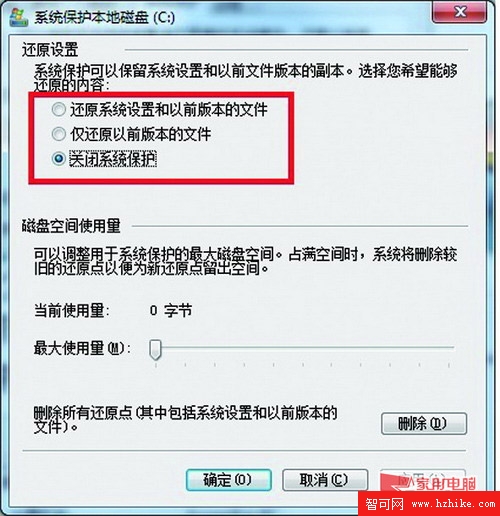
「電腦」→ 右鍵「屬性」→「系統保護」→「設定」→ 選擇「關閉系統保護」。系統還原實為自動備份功能,若不常需還原系統,關閉可大幅減少硬碟寫入。
此設定不影響日常使用,能有效降低硬碟頻繬讀寫頻率。
XP 直接升級 Windows 7 常見問答彙整
隨身碟/外接硬碟安裝 Windows 7:三大優勢與完整步驟
拒絕重複勞動:Windows 7 一次性批量設定檔案關聯(以 WMP 12 為例)
Windows 7 移動使用者設定檔資料夾至 D 槽:註冊表法完整教學
Windows 7 必學快速鍵大全:Win+方向鍵掌控視窗、跨螢幕、突顯當前
固態硬碟裝 Win7 完整優化指南:4K 對齊、AHCI、分區規劃、固件更新、Ghost 全盤拷貝
Windows 7 建立寬帶撥號 (PPPoE) 與無線網路連線完整教學
Windows 7 筆電三步變無線路由器:虛擬 WiFi 熱點完整教學