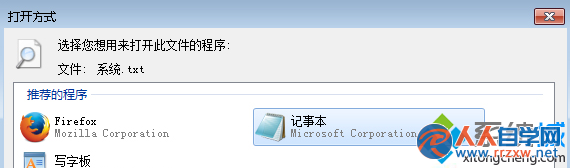
Win7 .txt 檔案關聯錯誤導致「找不到指令碼檔案」,三步驟修復:系統深度修復 → 右鍵檔案選「開啟方式」→ 選「記事本」設為預設。
sfc /scannow
與前文修復法相同,屬重複條目,提供精簡操作流程。
Win7 Chrome 被惡意綁定 hao123 首頁?刪除捷徑參數重建純淨捷徑
Win7 開啟 LOG 檔案全是亂碼?正確閱讀方式與工具推薦
Win7 螢幕解析度調整教學:右鍵桌面三步驟設定最佳顯示
Win7 旗艦版「滑鼠」屬性打不開?同樣用驅動重裝、新帳號、安全模式、系統還原解決
微軟推出 Windows Thin PC:針對低階/舊式電腦的 Win7 精簡版
Win7 瀏覽器禁用迅雷下載攔截 讓 IE 使用內建下載管理員
Win7 調整滑鼠游標閃爍粗細,輕鬆存取中心視覺化設定
Win7 透過 360 安全衛士「檔案復原」功能找回誤刪檔案與照片完整教學