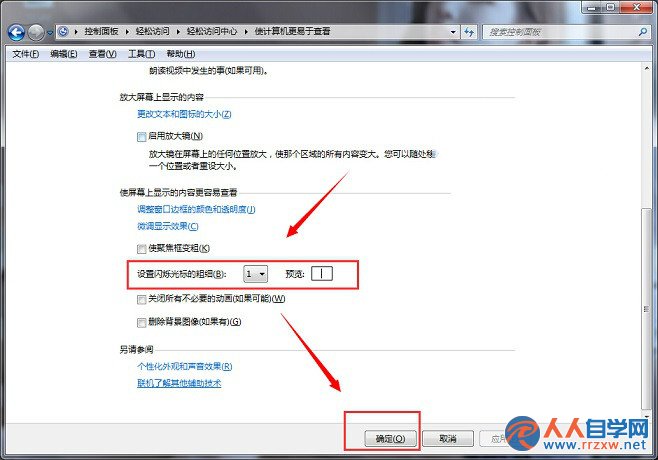
文字編輯時游標太細難辨識、太粗遮擋文字?Win7 「輕鬆存取中心」提供游標粗細調整滑桿,依個人視力習慣設定最舒適的閃爍游標寬度。
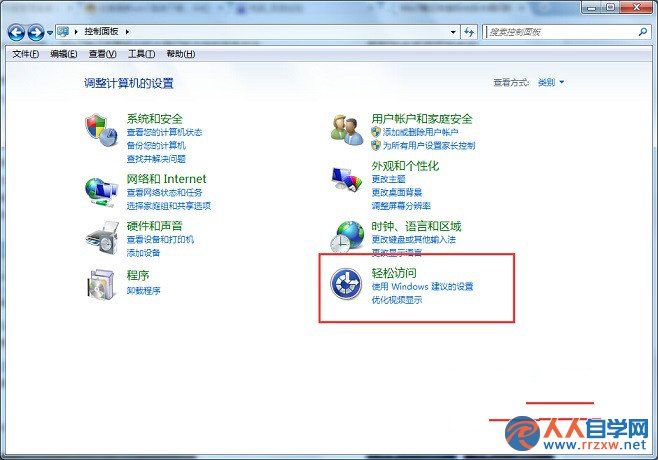
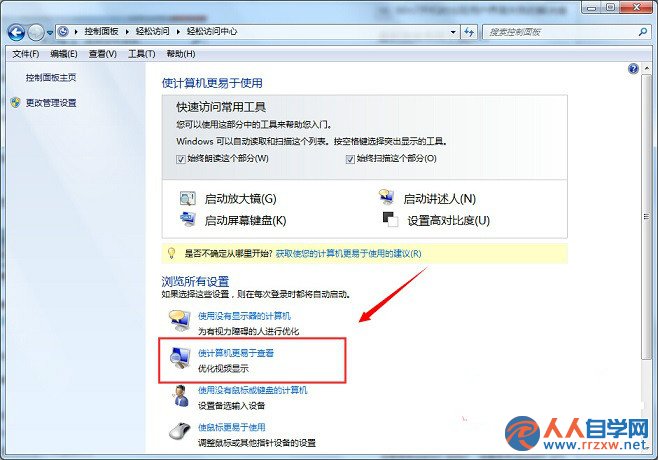
【控制台】→【輕鬆存取】→【輕鬆存取中心】→【讓電腦更容易看清】→【設定閃爍游標的粗細】
此設定對全系統文字編輯區(記事本、Word、輸入框)即時生效,無需重開機。
Windows 7 函式庫實戰技巧:建立、包含資料夾與高效使用
Win7一鍵獲取文件/資料夾 SYSTEM 權限:註冊表添加「管理員取得所有權」右鍵選單
Win7 AMD顯卡 (A卡) 遊戲無法全屏?註冊表修改 Scaling 值為 3 徹底解決
Win7 小工具 Gadgetarian 移植到 Win10:安裝教學、顯示錯誤修復與 DPI 縮放解決方案
Win7 資料夾加密教學:使用「護密資料夾加密軟體」AES/3DES 軍規加密
Windows 7 安裝並啟用 Telnet 服務完整指南
Win7 小鍵盤 NumLock 失靈?螢幕鍵盤啟用數字鍵盤救急
Win7 IE 瀏覽器防惡意下載:群組原則啟用「限制檔案下載」安全功能