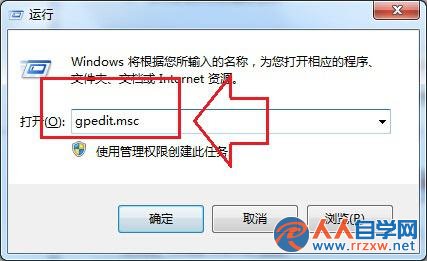
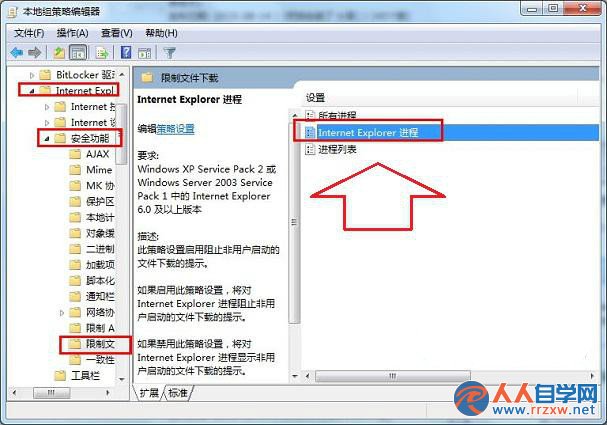
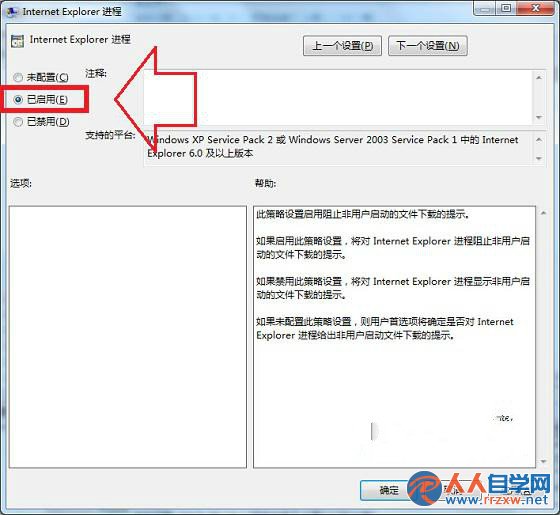
gpedit.msc → 電腦設定 → 管理範本 → Windows 元件 → Internet Explorer → 安全性功能 → 限制檔案下載 → Internet Explorer 進程 → 已啟用
啟用後,IE 會阻擋非使用者主動點擊觸發的自動下載(如駭頁腳本偷跑 exe),大幅降低木馬落地風險,搭配防毒軟體雙重防護。
為 Win7 檔案總管加上核取方塊 輕鬆多選檔案不靠 Ctrl 鍵
Win7 虛擬記憶體最佳設定教學:依實體記憶體 1.5~3 倍手動調整
Win7/XP 輸入法不見了?三大找回法:msconfig、語言列、進階文字服務
Win7 玩魔獸世界提示「儲存空間不足,無法處理此命令」的解決辦法
Win7 磁碟機顯示「未標記的磁碟區」?資料夾選項開啟「顯示磁碟機代號」
Win7 網路圖示一直轉圈圈?Network List Service 未啟動或補丁衝突完整解決方案
QQ 會員搶先體驗 QQ 硬盤:其實是「收藏的檔案」升級版
Win7 登入 iDRAC 提示「登入錯誤(憑證失敗)密碼錯誤」?卸載 IE11 並關閉自動更新即可