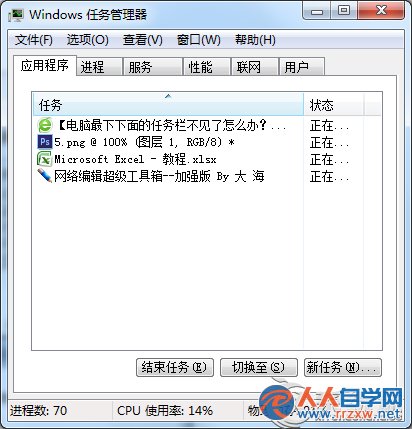
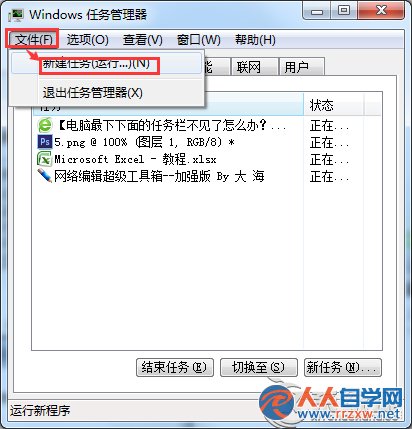
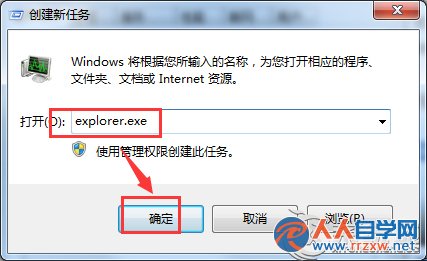
explorer.exe
Explorer.exe 掛掉會導致任務列、桌面圖示全消,重啟即刻恢復,比重開機快十倍。
Win7 BitLocker 解鎖後必須重開機才能再鎖定?CMD 一鍵鎖定指令免重開機
Win7 安裝 iTunes 遇到錯誤 2203?C 槽權限補全當前帳戶「完全控制」即可解決
Win7 如何關閉休眠與睡眠?電源選項將「使電腦進入睡眠狀態」設為「永不」
Win7 無法存取共用印表機?兩大錯誤代碼完整解決方案(啟用 Guest/群組原則)
Windows 7 系統字體修改全攻略:從介面風格到字型大小完整自訂
Win7 安裝程式無法建立新系統分區?硬碟安裝法完整解決流程
Win7 實現使用者自動登入:登錄檔設定 AutoAdminLogon
四步驟強化 Win7 系統安全:關閉預設共享、修改群組原則、限制功能、啟用防火牆