Windows XP Windows 7 Windows 2003 Windows Vista Windows 綜合教學 Linux 系統教學
Windows 10 Windows 8 Windows 2008 Windows NT Windows Server 電腦軟體教學

Win7 開機報錯 0xc0000098?BCD 引導配置資料損壞,安裝盤修復重建完整流程

編輯:Win7 常見問題解答
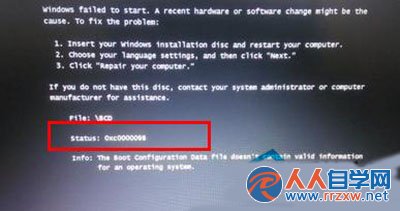
0xc0000098錯誤畫面

錯誤解碼

0xc0000098 (STATUS_FILE_INVALID):Windows 開機管理器 (`bootmgr`) 讀取 **BCD (Boot Configuration Data) 引導配置資料** 失敗,檔案損壞、遺失、或簽名驗證不通。常見於:磁碟錯誤、強制關機、多系統引導搶佔、備份還原導致 BCD 不匹配、惡意軟體破壞。

修復前提

  • 一張 **Windows 7/8/10 安裝光碟/USB** (版位需與系統一致:x64 修 x64,x86 修 x86)。
  • 電腦設定從光碟/USB 開機 (BIOS/UEFI 開機順序)。

命令列修復標準流程 (經實測高成功率)

  1. 從安裝媒體開機 → 選擇語言/鍵盤/時間 → 下一步 → 左下角 「修復您的電腦」。
  2. 選擇作業系統 (通常只有一項) → 下一步 → 選擇 「命令提示字元」。
  3. 在 CMD 中依序輸入以下指令,**每行結尾按 Enter**:
    c:
    cd boot
    attrib bcd -s -h -r
    ren c:\boot\bcd bcd.old
    bootrec /rebuildbcd
    
  4. 最後一條指令 `bootrec /rebuildbcd` 會掃描磁碟尋找 Windows 安裝,提示 `Add installation to boot list? Yes/No/All` → 輸入 `Y` (或 `A` 多系統) → Enter。
  5. 提示「The operation completed successfully」→ 移除安裝媒體 → 重新啟動電腦。

指令詳解

指令作用
`c:`切換到系統盤 (安裝媒體環境下系統盤通常仍為 C:,若非請用 `diskpart` -> `list volume` 確認)
`cd boot`進入 BCD 所在目錄
`attrib bcd -s -h -r`移除 BCD 檔案的系統/隱藏/唯讀屬性,以便重命名
`ren c:\boot\bcd bcd.old`備份損壞的 BCD 為 bcd.old,騰出位置給新建
`bootrec /rebuildbcd`掃描所有磁碟 Windows 安裝,重建全新 BCD 並加入啟動清單

補充修復指令 (若上述無效,依序嘗試)

bootrec /fixmbr        # 修復 MBR 主開機記錄 (不動分區表)
bootrec /fixboot       # 寫入新的開機磁區到系統分區
bootrec /scanos        # 掃描並顯示所有找到的 Windows 安裝 (不修改 BCD)
bcdedit /export c:\bcdbackup  # 匯出現有 BCD 供分析

UEFI 系統特殊處理

若為 UEFI 開機 (GPT 分區、EFI 系統分區),BCD 位於 `EFI\Microsoft\Boot\BCD`。修復流程:

  1. `diskpart` → `list disk` → `sel disk X` → `list partition` → 找到 **EFI 系統分區** (通常 100-500MB, FAT32) → `sel partition Y` → `assign letter=Z` → `exit`。
  2. `Z:` → `cd EFI\Microsoft\Boot` → `attrib BCD -s -h -r` → `ren BCD BCD.old` → `bootrec /rebuildbcd` (或手動 `bcdedit /create` 重建)。
  3. 確保 UEFI 開機順序中 `Windows Boot Manager` 指向正確的 `.efi` 檔案。
預防建議: 定期備份 BCD:`bcdedit /export D:\BCD_Backup_$(date).bcd`。多系統環境建議使用 **EasyBCD** 或 **Ventoy + 多 ISO** 管理引導,避免手動 `bcdedit` 操作失誤。

Copyright © Windows教程網 All Rights Reserved