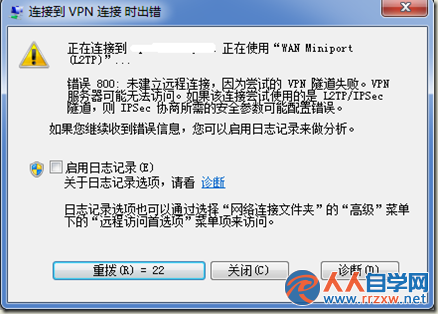
補充: VPN 800 常因 GRE 協定被防火牆封鎖、MTU 過大導致分片、或 TCP 視窗設定不當引起。步驟 2 的 TCP 視窗歸零可強制重新協商 MSS,繞過部分攔截。若無效,檢查路由器/防火牆是否開啟 PPTP 穿透(GRE 協定 47)、嘗試降低 MTU(如 1400)、或改用 L2TP/IPSec、SSTP 等更穩定協定。
Win7 如何完整移除 Windows Virtual PC 虛擬機?透過「檢視已安裝更新」卸載 KB958559
Win7 旗艦版搜尋不到檔案?擴大搜尋範圍找回遺失資料
Win7 系統如何恢復已清空回收站的檔案
Windows 7 三個實用小技巧:移除隱藏側邊欄、應用程式控制原則、啟用快速啟動列
Win7 旗艦版開機要求按 Ctrl+Alt+Delete 登入?群組原則啟用「互動式登入無需按 Ctrl+Alt+Del」
Windows 7 釋放 C 槽空間實戰:三招精減系統佔用
Win7 安裝盤分區避坑指南:手動創建主分區拒絕 100MB 隱藏分區
Win7 玩《英雄聯盟》頻繁自動關機?硬體與軟體完整排查指南