Windows 7 有許多鍵滑鼠組合技,今天分享一個最快查看檔案屬性的小技巧:按住 Alt 鍵並滑鼠左鍵雙擊檔案,即可直接彈出屬性視窗,完全跳過冗長的右鍵選單。
為什麼需要這個技巧?
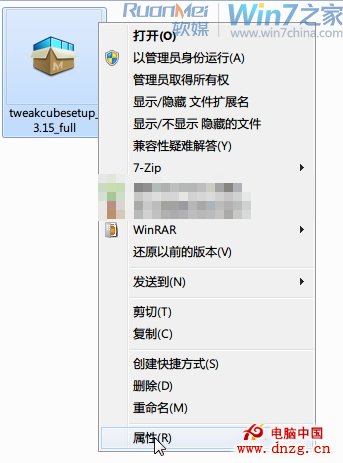
- 右鍵選單項目過多,移動滑鼠費時。
- 滑鼠移至「傳送至」等子選單時常卡頓。
- 雖可按 R 熱鍵選擇屬性,但右鍵選單有時延遲彈出。
操作方式
- 鍵盤左手按住 Alt 鍵不放。
- 滑鼠右手對目標檔案執行左鍵雙擊。
- 直接開啟「屬性」視窗,無任何選單干擾。
適用對象
適合慣用「左手鍵盤、右手滑鼠」的玩家(CS、魔獸等)。若習慣單手滑鼠操作,傳統右鍵可能更順手。