Windows XP Windows 7 Windows 2003 Windows Vista Windows 綜合教學 Linux 系統教學
Windows 10 Windows 8 Windows 2008 Windows NT Windows Server 電腦軟體教學

Windows 7 執行 CMD 提示「找不到檔案」?從正常系統複製 cmd.exe 修復

編輯:Win7 系統應用技巧

執行 cmd 跳出「Windows 找不到檔案」,主因 C:\Windows\System32\cmd.exe 遺失/被刪。從同版本正常系統複製回來即可修復。

修復步驟

  1. 準備 USB 隨身碟,插入同版本 (同位元數、同語言) 正常運行 Windows 7 的電腦。
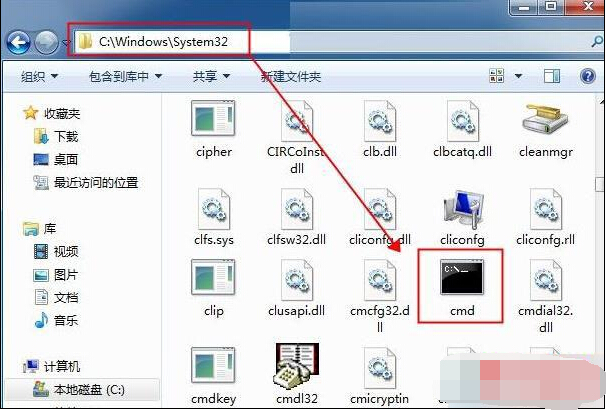
  2. 複製 C:\Windows\System32\cmd.exe 至 USB。
  3. 插入故障電腦 (可進安全模式或 PE 環境) → 貼上至 C:\Windows\System32\ 覆蓋。
  4. 重新執行 cmd 驗證修復。

注意:務必確保來源 cmd.exe 版本完全一致 (x86/x64、中文/英文),否則可能導致系統不穩。若無同版本電腦,可從 Windows 7 安裝 ISO 用 7-Zip 解壓 install.wim → 1\Windows\System32\cmd.exe 取得。

Copyright © Windows教程網 All Rights Reserved