錯誤現象
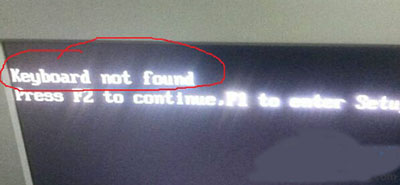
開機 POST 階段顯示 Keyboard not found 或 `Keyboard error`,提示按 F1 進入 Setup、F2 繼續。
原因分析
- 鍵盤未正確連接(USB/PS2 接口鬆動、損壞)。
- BIOS 設定要求偵測到 PS/2 鍵盤才能繼續(舊主機板常見),但使用 USB 鍵盤且 BIOS 未啟用 "USB Legacy Support"。
- 鍵盤硬體故障或主機板接口損壞。
解決步驟
- 檢查實體連接(最常見): 關機斷電 → 拔下鍵盤 → 重新插緊 (USB 插背板直連口、PS2 針腳無彎折) → 開機測試。
- 啟用 USB Legacy Support(USB 鍵盤無法在 BIOS/安裝階段工作): 進入 BIOS → Advanced/Peripherals → 啟用 USB Legacy Support / USB Keyboard Support → 儲存離開。
- 更換鍵盤/接口測試: 換一支確定正常的鍵盤,或換用 PS2/USB 不同接口測試,隔離是鍵盤壞還是主機板口壞。
- BIOS 設定「無鍵盤也啟動」: 部分 BIOS 有 "Halt On: All Errors" 預設,改為 "Halt On: No Errors" 或 "All But Keyboard" 可忽略鍵盤錯誤直接開機(適用於無頭伺服器/遠端管理)。
總結
90% 以上為接觸不良或 USB Legacy Support 未開。重插拔、開啟 BIOS 選項即可解決。若換鍵盤仍報錯,主機板接口損壞需維修。