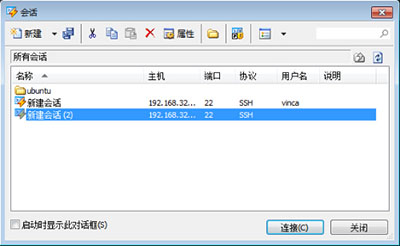
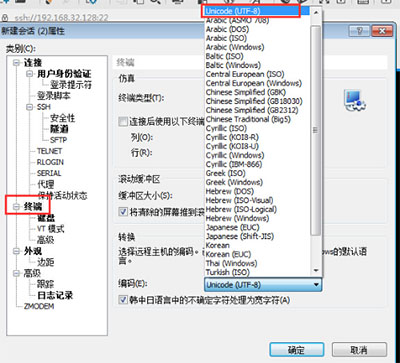
Xshell 破解版/英文版預設編碼非 UTF-8,導致連線 Linux 伺服器顯示中文亂碼。修改工作階段編碼即可修正。
建議:官方中文版 Xshell 免費個人版已內建 UTF-8 預設,且介面中文化,建議下載正版避免編碼與法律風險。
Win10 更新顯卡驅動後畫面變大、模糊不清怎麼辦?
Windows 7 桌面提示「此 Windows 副本不是正版」解決:更換未被封鎖的零售版金鑰並線上驗證
Win7 右鍵選單加入常用網站:登錄表一鍵部署
電腦繪漫畫入門:軟體與硬體完整指南
Win+Tab 體驗 Windows 7 炫酷 3D 視窗切換
Windows 7 更換登入畫面背景教學:登錄檔法與工具法
Win7 清理工作列圖示:自訂通知區域隱藏不常用圖示
Win7 x64 藍屏 0x00000101 (CLOCK_WATCHDOG_TIMEOUT) 完整排查指南:從硬體到驅動逐層擊破