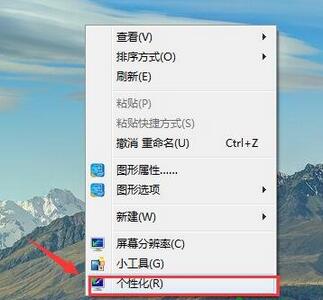
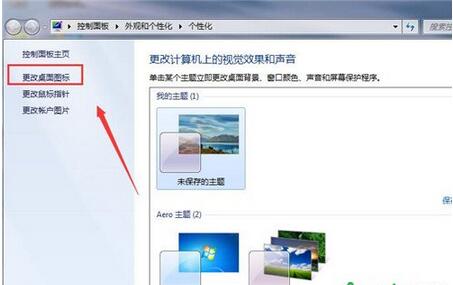
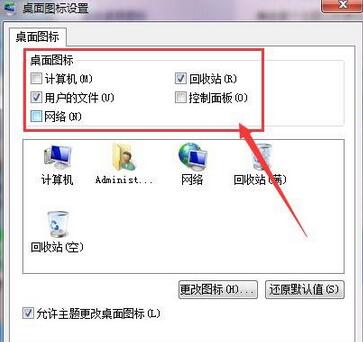
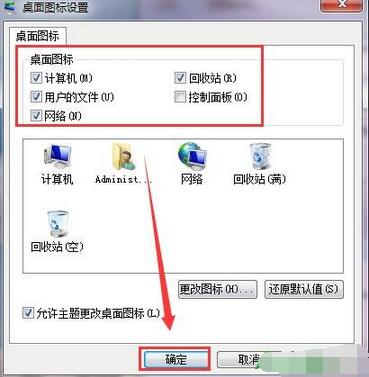
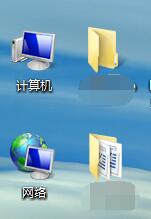
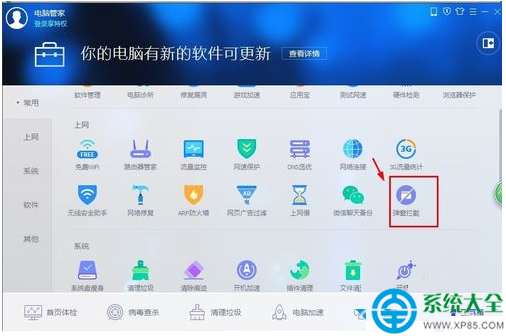
桌面預設「電腦」「網路」「使用者的檔案」圖示消失?進入個人化→桌面圖示設定,勾選即恢復,最基礎也最實用的桌面整理技巧。
桌面圖示即刻恢復。同介面也可更改各圖示圖片 (點選圖示 →「變更圖示」)。
Windows 7 磁碟管理「無法建立新磁碟區」錯誤解決:主分區/擴展分區限制詳解
Win7 提示「找不到網路路徑」錯誤 0x80070035?檢查防火牆與網路探索
Win7 透過群組原則禁止「系統還原至預設狀態」防止誤操作
Win7 藍畫面 0x0000001E 解決:磁碟空間、驅動衝突、VGA 相容、BIOS 更新、最後正確配置
Win7 升級後音訊破音、雜音?舊版驅動程式反而更穩定
Windows 7 搜尋功能不見了?檢查權限與開啟 Windows Search 功能
Win7 區域網路設定完整指南:工作群組統一、網路探索開啟、共用權限配置
Win7 讓 QQ、酷狗、PPS 圖示顯示在工作列右下角:自訂通知區域圖示