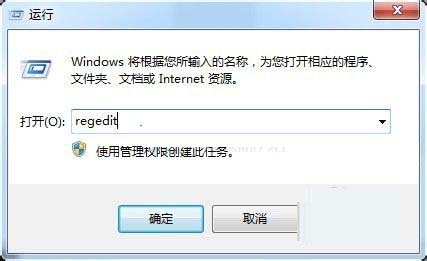
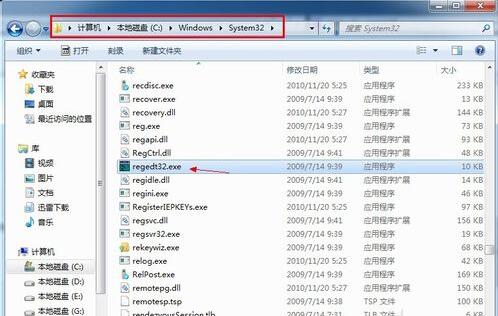
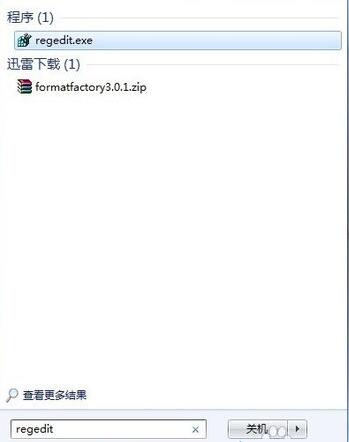
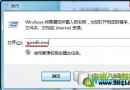
註冊表編輯器是系統核心設定庫。提供三種開啟方式,新手也能輕鬆找到入口。
regedit
Windows\System32
regedt32.exe
⚠️ 修改前請務必**備份註冊表**(檔案 → 匯出),以防誤操作導致系統異常。
手機觸屏壞了無法開啟 USB 調試怎麼刷機?卡刷/Recovery/OTG 鼠標/深度刷機工具
Win7 開關機卡在「正在安裝更新」如何關閉自動更新
Win7 如何緊急重新開機?Ctrl+Alt+Del→按住 Ctrl 點電源鈕→確定強制重啟
Win7 自訂桌面主題完整教學:壁紙、聲音、圖示一次搞定
Windows 7 系統服務完整認知與優化指南:啟動類型、延遲啟動、備份還原
Win7 啟用檔案與印表機共享:網路共享中心六步驟圖解
Windows 7 工作列進階技巧 8 招:快速啟動、庫導向、Jumplist 增強、玻璃特效、硬體監控全掌握
Win7 搜尋功能無法使用怎麼辦?修改登錄表啟用搜尋