Win7 任務列圖示無法鎖定、桌面捷徑顯示難看的小箭頭,皆可透過匯入註冊表檔一次解決。原理是清除 lnkfile/piffile 的 IsShortcut 字串值,並設定 Shell Icons 覆蓋圖示索引 29 為空白圖示。
Windows Registry Editor Version 5.00

[HKEY_CLASSES_ROOT\lnkfile]
"IsShortcut"=-

[HKEY_CLASSES_ROOT\piffile]
"IsShortcut"=-

[HKEY_CURRENT_USER\Software\Microsoft\Windows\CurrentVersion\Explorer\Shell Icons]
"29"="C:\\Windows\\System32\\shell32.dll,50"

[HKEY_LOCAL_MACHINE\SOFTWARE\Microsoft\Windows\CurrentVersion\Explorer\Shell Icons]
"29"="C:\\Windows\\System32\\shell32.dll,50"
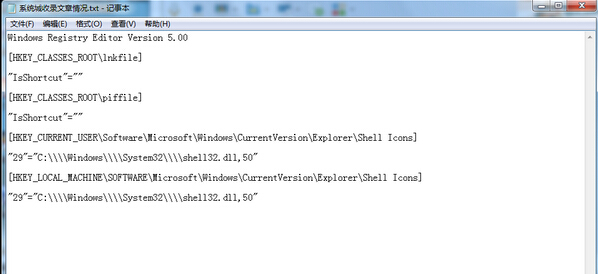
FixTaskbarArrow.reg(編碼選 ANSI 或 UTF-16 LE)。explorer.exe 生效。
IsShortcut 存在時,系統在捷徑圖示左下角疊加小箭頭覆蓋圖示;刪除該值即移除箭頭。shell32.dll 第 50 個圖示(空白 16x16 圖示),達到同樣隱藏效果,雙重保險。Windows Registry Editor Version 5.00
[HKEY_CLASSES_ROOT\lnkfile]
"IsShortcut"=""
[HKEY_CLASSES_ROOT\piffile]
"IsShortcut"=""
[HKEY_CURRENT_USER\Software\Microsoft\Windows\CurrentVersion\Explorer\Shell Icons]
"29"=-
[HKEY_LOCAL_MACHINE\SOFTWARE\Microsoft\Windows\CurrentVersion\Explorer\Shell Icons]
"29"=-
另存為 RestoreArrow.reg 執行即可恢復小箭頭。