Win7 系統盤面顯示「Windows 安全中心服務未啟動」/「無法啟動 Windows 安全中心」,防毒/防火牆/更新狀態無法監控。核心為 Security Center 服務及其依賴服務 (RPC、WMI) 異常。
services.msc 開啟服務管理器。eventvwr.msc) → Windows 記錄 → 系統 → 來源 Service Control Manager,查看具體錯誤。winmgmt /resetrepository → 重開機。C:\Windows\System32\wbem\Repository 是否損壞,可從健康系統複製替換 (需 PE/安全模式)。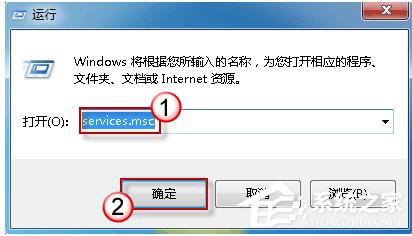
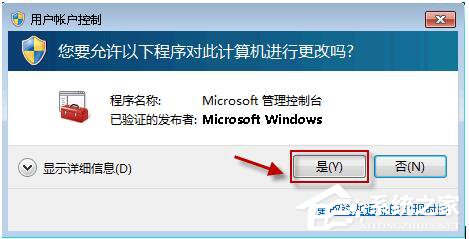
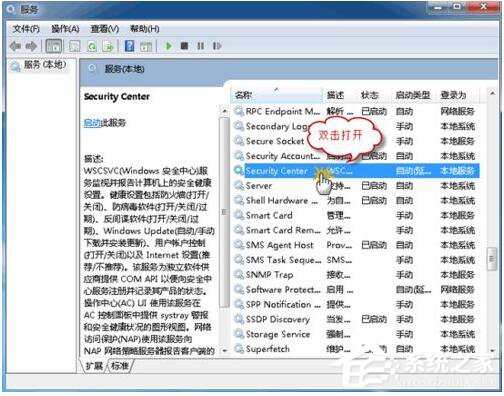
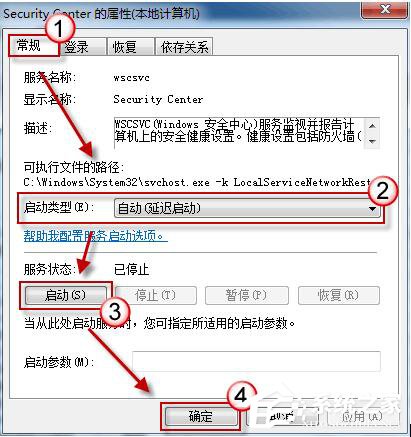
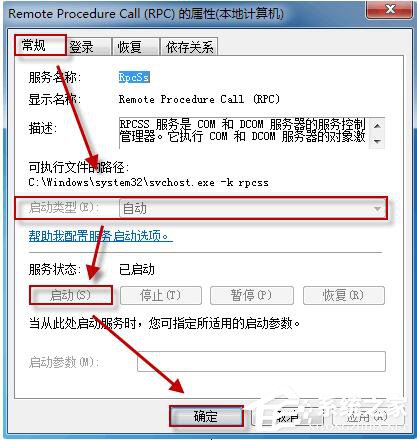
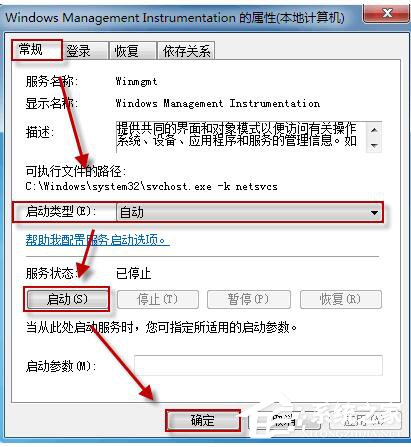
sc config wscsvc start= auto
sc start wscsvc
sc config winmgmt start= auto
sc start winmgmt
# 若 RPC 停用極罕見,系統將極度不穩,建議修復安裝/重灌
HKLM\SOFTWARE\Microsoft\Security Center → AntiVirusDisableNotify, FirewallDisableNotify, UpdatesDisableNotify 均為 0 (啟用通知)。若為 1 可改為 0。
| 現象 | 可能原因 | 對策 |
|---|---|---|
| 安全中心服務啟動後自動停止 | WMI 儲存庫損壞 / 防毒軟體衝突 | winmgmt /resetrepository / 卸載第三方防毒 |
| RPC 服務異常 | 系統核心損壞 / 惡意軟體 | SFC/DISM / 掃毒 / 修復安裝 |
| 面板顯示「未找到防毒軟體」 | 防毒軟體未向 WSC 註冊 / 版本過舊 | 更新/重裝防毒軟體 / 確認支援 WSC |
依序確保 RPC → WMI → Security Center 三服務正常,安全中心即可恢復監控功能。