Windows XP Windows 7 Windows 2003 Windows Vista Windows 綜合教學 Linux 系統教學
Windows 10 Windows 8 Windows 2008 Windows NT Windows Server 電腦軟體教學

Win7 升級 Win10 出現 0x800704c7 錯誤?重置 Windows Update 元件解決

編輯:Win7 系統應用技巧

Win7 透過 Windows Update 升級 Win10 時出現 0x800704c7,通常是 Update 元件損毀、快取衝突、第三方服務干擾。重置 Update 服務與快取、清理啟動項可解決。

修復步驟

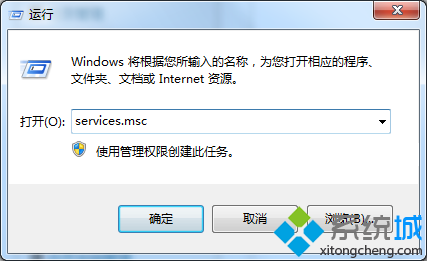
  1. Win + R → services.msc → 找到 Windows Update → 右鍵「停止」。
  2. 開啟 C:\Windows\SoftwareDistribution → 刪除 Download 與 DataStore 資料夾內所有內容 (資料夾本身保留)。
  3. 回 services.msc → 右鍵 Windows Update → 「啟動」。
  4. Win + X → 「工作管理員」→「啟動」索引標籤 → **全部停用** 第三方啟動項 (保留 Microsoft 簽署項)。
  5. 重新開機,再次嘗試升級 Win10。

進階修復 (若上述無效)

  1. CMD (管理員) 依序執行:
    net stop wuauserv
    net stop bits
    net stop cryptsvc
    ren C:\Windows\SoftwareDistribution SoftwareDistribution.old
    ren C:\Windows\System32\catroot2 catroot2.old
    net start wuauserv
    net start bits
    net start cryptsvc
  2. 執行 sfc /scannow 修復系統檔案。
  3. 使用 Windows 10 升級助理 或 媒體建立工具 (官網下載 ISO/USB) 離線升級,繞過 Windows Update 管道。

常見升級錯誤代碼對照

代碼常見原因
0x800704c7Update 服務/快取損毀、第三方服務衝突
0x80070002 / 0x80070003系統檔案遺失/損毀
0xC1900101驅動程式不相容 (顯卡/儲存控制器)
0x8007042B第三方防毒/安全軟體攔截

升級前檢查清單

  • ☑ 備份重要資料 (OneDrive/外接硬碟/雲端)。
  • ☑ 解除安裝第三方防毒/安全套裝 (保留 Windows Defender)。
  • ☑ 更新 BIOS、晶片組、顯卡、儲存控制器驅動至最新版。
  • ☑ 確認 C: 剩餘空間 ≥ 20 GB (建議 30 GB+)。
  • ☑ 斷開非必要 USB 裝置 (僅保留鍵盤/滑鼠/網路)。
Copyright © Windows教程網 All Rights Reserved