Windows XP Windows 7 Windows 2003 Windows Vista Windows 綜合教學 Linux 系統教學
Windows 10 Windows 8 Windows 2008 Windows NT Windows Server 電腦軟體教學

Win7 無線網路圖示消失不見?兩大修復法:介面卡啟用與登錄圖示快取重建

編輯:Win7 系統應用技巧

工作列通知區域無線網路圖示消失,可能是無線網卡被停用,或系統托盤圖示快取損毀。
方法一:檢查無線網卡是否被停用

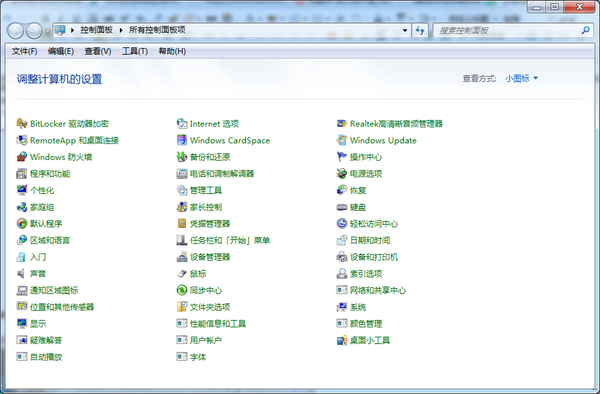
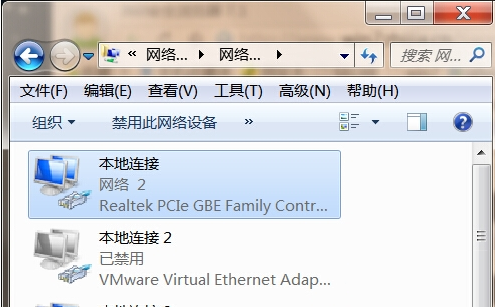
  1. 控制台 → 檢視方式「小圖示」 → 「網路和共用中心」 → 左側「變更介面卡設定」。
  2. 找到「無線網路連線」 → 若顯示灰色/「已停用」 → 右鍵 → 「啟用」。
  3. 啟用後圖示通常自動回到通知區域。

方法二:重建系統托盤圖示快取(登錄法)

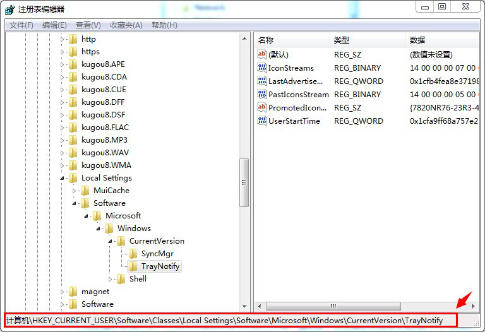
  1. Win + R → regedit → 確定。
  2. 展開路徑:
    HKEY_CURRENT_USER\Software\Classes\Local Settings\Software\Microsoft\Windows\CurrentVersion\TrayNotify
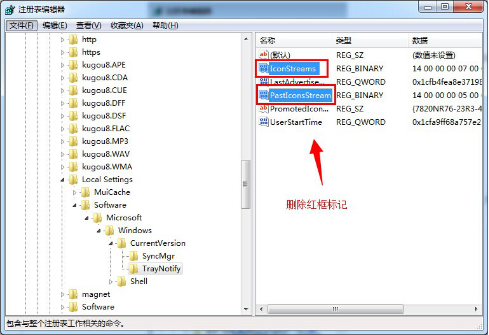
  3. 右側找到並刪除兩個值:
    ✅ IconStreams
    ✅ PastIconsStream
  4. 登出/重新開機 → explorer.exe 重建快取,無線圖示恢復顯示。

💡 進階:重新啟動 Windows Explorer

工作管理員 → 找到 explorer.exe → 右鍵「重新啟動」,或 CMD 執行:
taskkill /f /im explorer.exe && start explorer.exe
可嘗試快速恢復圖示而無需重開機。


Copyright © Windows教程網 All Rights Reserved