Windows XP Windows 7 Windows 2003 Windows Vista Windows 綜合教學 Linux 系統教學
Windows 10 Windows 8 Windows 2008 Windows NT Windows Server 電腦軟體教學

Win7 桌面圖示不自動重新整理?登錄修復 Update 鍵值解決

編輯:Win7 系統應用技巧

Win7 桌面新增/刪除/重命名檔案後圖示不即時更新,需手動按 F5 才重新整理,主因是登錄缺少 Update 鍵值。本文提供登錄編輯器修復步驟。

修復步驟

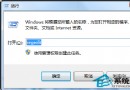
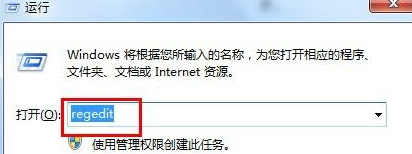
  1. 按 Win + R 輸入 regedit 開啟登錄編輯器。
  2. 展開至 HKEY_LOCAL_MACHINE\SYSTEM\CurrentControlSet\Control。
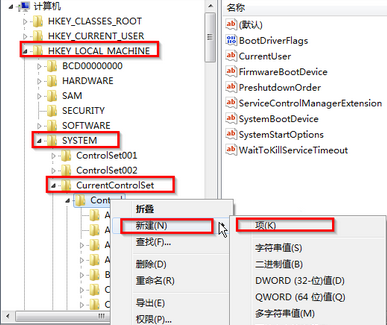
  3. 右鍵 Control 資料夾 → 「新增」→ 「項目」,命名為 Update。
  4. 右鍵新建的 Update → 「新增」→ 「項目」,命名為 UpdateMode。
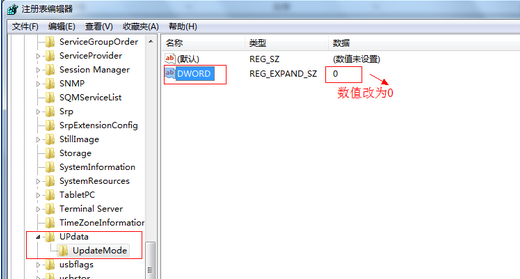
  5. 在 UpdateMode 右側空白處右鍵 → 「新增」→ 「可擴充字串值 (REG_EXPAND_SZ)」,名稱設為 DWORD (大寫)。
  6. 雙擊 DWORD,數值資料輸入 0,確定。
  7. 重新開機或重新啟動 explorer.exe 即可生效。

原理說明

Windows 透過 SHChangeNotify 機制通知 Explorer 重新整理桌面。缺少 Update\UpdateMode\DWORD=0 會導致通知機制失效,補上此鍵值即可恢復自動重新整理。

替代方案

  • 若不想動登錄,可建立批次檔 (.bat) 內容為 taskkill /f /im explorer.exe & start explorer.exe,按一下即可手動重啟 Explorer 重新整理。


  • 檢查是否有第三方桌面美化/管理軟體攔截通知,嘗試關閉或解除安裝。
Copyright © Windows教程網 All Rights Reserved