Windows XP Windows 7 Windows 2003 Windows Vista Windows 綜合教學 Linux 系統教學
Windows 10 Windows 8 Windows 2008 Windows NT Windows Server 電腦軟體教學

Win7 滑鼠右鍵失靈?登錄表修復 NoViewContextMenu 完整步驟

編輯:Win7 系統應用技巧

Windows 7 滑鼠右鍵點擊桌面、資料夾或工作列無反應、不彈出選單,常因登錄表 NoViewContextMenu 被設為 1(禁用右鍵選單)。透過登錄編輯器改回 0 即可恢復。

修復步驟

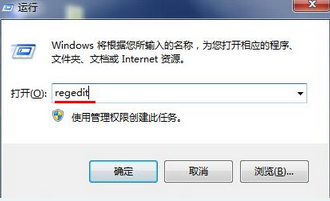
  1. Win+R 輸入 regedit 開啟登錄編輯器。
  2. 定位至:
    HKEY_CURRENT_USER\Software\Microsoft\Windows\CurrentVersion\Policies\Explorer
  3. 右側找到 NoViewContextMenu,雙擊修改數值資料為 0(若不存在則新增 DWORD 值命名為 NoViewContextMenu 並設為 0)。
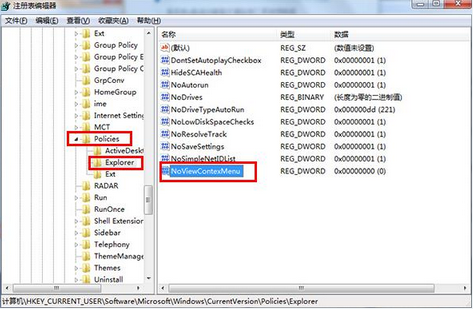
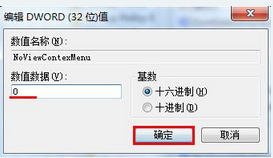
  4. 按確定,登出或重開機即可恢復右鍵選單功能。

同場加映:命令列快速修復

以系統管理員身分開啟 CMD,輸入以下指令並重開機:

reg add HKCU\Software\Microsoft\Windows\CurrentVersion\Policies\Explorer /v NoViewContextMenu /t REG_DWORD /d 0 /f

排除其他原因

  • 若修復後仍無效,檢查 HKEY_LOCAL_MACHINE 同路徑下是否也有此值。
  • 第三方殼擴充套件(如壓縮軟體、雲端同步工具)損壞也會導致右鍵卡頓或無反應,可用 ShellExView 停用非微軟擴充項測試。
  • 病毒木馬常修改此鍵值禁用右鍵,修復前建議完整掃毒。
Copyright © Windows教程網 All Rights Reserved