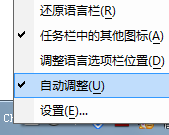
語言列固定在工作列最左邊難用?三招改善:
本質限制:Win7 語言列屬工具列性質,無法像 Win10 那樣自由拖曳定位,上述為最大化可用空間的折衷方案。
Win7 寬帶連線錯誤 711 完整修復:LogFiles 權限與服務啟動雙管齊下
「我的電腦」無法開啟?木馬修改登錄/感染 explorer.exe 致病
Win7 找不到「寫字板」?兩種快速開啟方法教學
Win7 修改「我的文件」預設儲存路徑至 D/E 槳,保護資料不因重灌遺失
家用電腦 CPU 選 E3 還是 i5?有獨顯上 E3(Xeon),靠核顯上 i5,但現在都建議買新平台
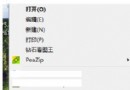
Win7 檔案被 360 隔離怎麼還原?殺毒/衛士「隔離區/恢復區」勾選還原即可
Win7 關閉自動更新完整教學:批次檔一鍵停用、服務停用雙重保障
Win7 純淨版 Excel 2007 尋找/取代資料完整教學:查找選項與範圍設定