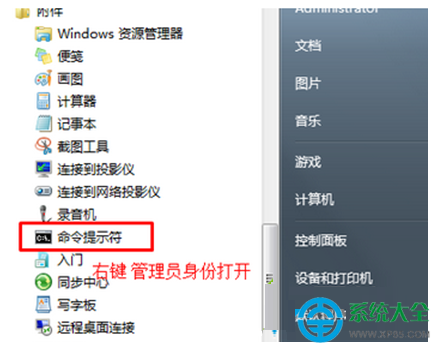
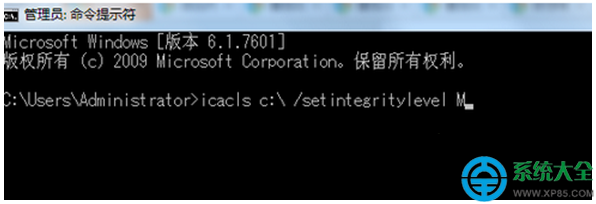
Windows 7 系統中,若直接複製檔案到 C 槽根目錄出現「錯誤 0×80070522」,是因為預設權限不允許標準使用者寫入系統磁碟根目錄。請以管理員身分執行指令授權:
icacls c: /setintegritylevel M
說明:/setintegritylevel M 將 C 槽完整性層級設為 Medium,允許管理員權限的程式寫入。若仍無法複製,請確認檔案未被其他程式鎖定,或嘗試複製到使用者資料夾(如 C:\Users\您的帳號\Documents)而非根目錄。
/setintegritylevel M
C:\Users\您的帳號\Documents
Win7 關閉 IPv6 完整指令法:netsh 逐項停用 6to4/ISATAP/Teredo/隱私/隨機介面識別碼
Win7 怎麼加入網路印表機?「列印管理」精準部署步驟圖解
Win7 螢幕畫面模糊不清的兩種表現與修復方案
Win7 儲存網頁圖片三大絕招:截圖工具、另存網頁完整檔、IE 暫存檔案夾挖寶
Win7 修改 MAC 位址三大方法:工具法、裝置管理員法、登錄檔法完整教學
Windows 7 最安全的檔案共享設定教學:無需關閉防火牆、無需啟用 Guest 帳號
电信光猫桥接模式设置宽带拨号上网的完整实操指南
Win7 Windows Media Center 無法啟動?關閉再開啟 Windows 功能重置組件