Windows XP Windows 7 Windows 2003 Windows Vista Windows 綜合教學 Linux 系統教學
Windows 10 Windows 8 Windows 2008 Windows NT Windows Server 電腦軟體教學

Win7 IE 收藏夾無法儲存網址?登錄表修正 Favorites 路徑教學

編輯:Win7 系統應用技巧

Windows 7 使用者發現 IE 瀏覽器的「收藏夾」無法新增或儲存網址,點擊「加入收藏夾」後完全無反應。這通常是因為登錄表中 User Shell Folders 下的 Favorites 路徑錯誤(指向不存在的資料夾)所致。修正登錄值即可恢復正常。

修復步驟

  1. 按 Win + R 開啟「執行」,輸入 regedit 按 Enter,開啟「登錄編輯器」。
  2. 依路徑展開:
    HKEY_CURRENT_USER\Software\Microsoft\Windows\CurrentVersion\Explorer\User Shell Folders
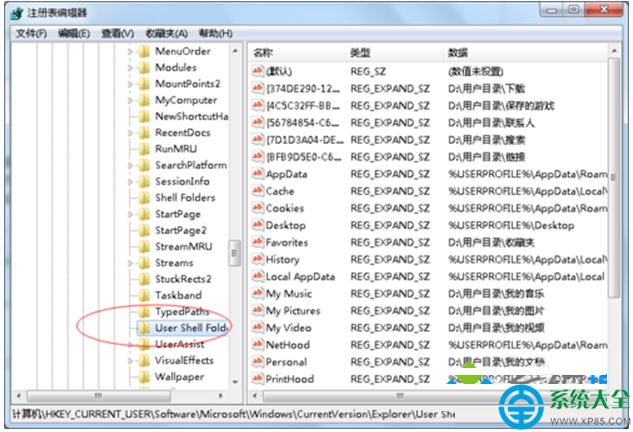
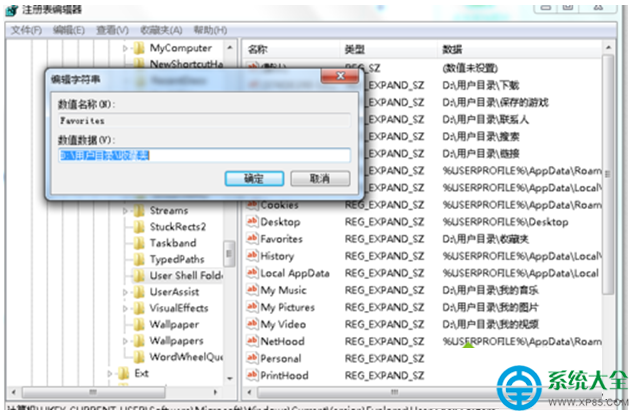
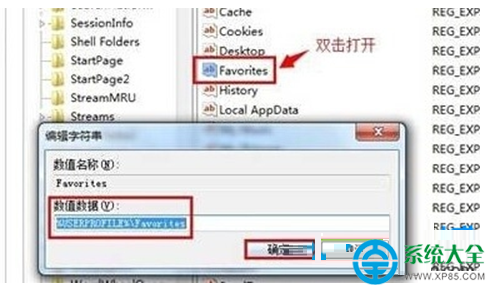
  3. 在右側窗格找到 Favorites 字串值,雙擊開啟。
  4. 將「數值資料」修改為:%USERPROFILE%\Favorites(注意反斜線),點擊確定。
  5. 關閉登錄編輯器,重新啟動電腦,IE 收藏夾功能即可恢復正常。

補充說明:若 %USERPROFILE%\Favorites 資料夾不存在,系統會自動建立。此法同樣適用於 Win8/Win10 的 IE 模式。

Copyright © Windows教程網 All Rights Reserved