Windows XP Windows 7 Windows 2003 Windows Vista Windows 綜合教學 Linux 系統教學
Windows 10 Windows 8 Windows 2008 Windows NT Windows Server 電腦軟體教學

Win7 光碟機彈不出?修改註冊表 StagingPath 恢復燒錄暫存路徑

編輯:Win7 系統應用技巧

光碟機按鈕無反應、右鍵「推出」也失效,常因註冊表燒錄暫存路徑 StagingPath 設定錯誤或遺失。修正該路徑為有效目錄(預設 C:\Users\<用戶名>\AppData\Local\Microsoft\Windows\Burn\Burn)即可恢復正常彈出。

操作步驟

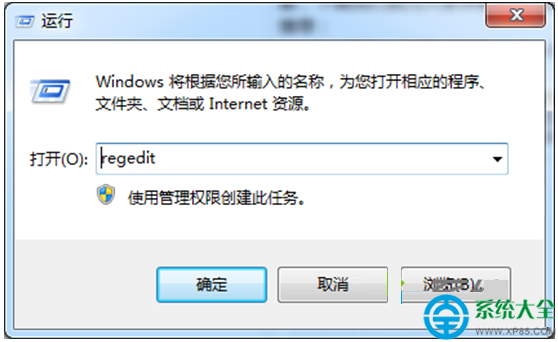
  1. Win+R ► regedit 開啟註冊表編輯器。
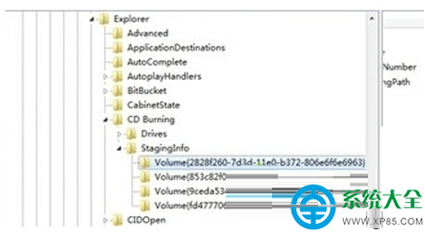
  2. 展開至:
    HKEY_CURRENT_USER\Software\Microsoft\Windows\CurrentVersion\Explorer\CD Burning\StagingInfo\Volume\{...}
  3. 右側找到 StagingPath,雙擊修改為任一有效存在的資料夾路徑(建議使用預設路徑或自建 D:\CDBurnTemp)。
  4. 確定儲存,重新開機或重啟 explorer.exe 生效。

補充排查

  • 確認光碟機實體彈出鈕無卡住、電源線接妥。
  • 裝置管理員檢查光碟機驅動狀態,嘗試更新/重裝驅動。
  • 命令提示字元輸入 eject D:(D 為光碟機代號)測試軟體彈出。
Copyright © Windows教程網 All Rights Reserved