想快速切換休眠功能?只需建立兩個批次檔(.bat)放在桌面,雙擊即可一鍵開啟或關閉休眠模式,省去繁瑣的控制台操作。
製作步驟
- 以系統管理員身分開啟「記事本」(開始→所有程式→附件→記事本右鍵選「以系統管理員身分執行」)。
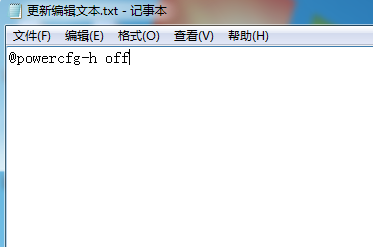
- 輸入指令:
關閉休眠:@powercfg -h off
開啟休眠:@powercfg -h on
(兩個指令需分別建立兩個文字檔)
- 點選「檔案」→「另存新檔」,檔名分別命名為「關閉休眠.bat」與「開啟休眠.bat」,存檔類型選「所有檔案」。
將兩個 .bat 檔放置桌面,未來需要切換休眠狀態時,只要雙擊對應圖示即可生效,方便快捷。