Windows 7 開始選單的搜尋框極為實用,可快速尋找程式、檔案、設定。若搜尋框突然不見,通常是「Windows Search」功能被關閉。只需在「開啟或關閉 Windows 功能」中重新啟用即可找回。
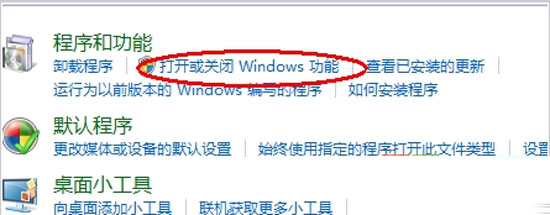
1. 開啟 Windows 功能視窗
控制台 →「程式與功能」→ 左側「開啟或關閉 Windows 功能」。

2. 啟用 Windows Search
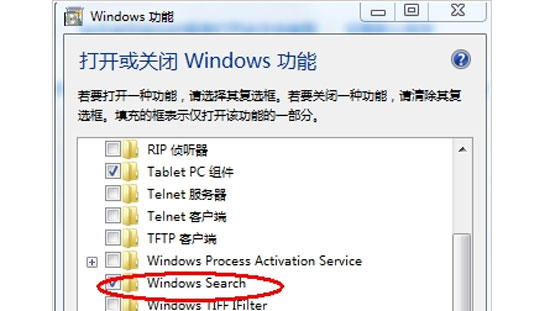
在功能清單中找到「Windows Search」,打勾 → 確定。系統將安裝相關元件(約需數分鐘),完成後重新開啟開始選單,搜尋框即會出現。
Windows Search 服務也提供檔案內容索引,啟用後可大幅提升檔案搜尋速度。若不慎關閉,依照上述步驟即可快速恢復。