Windows XP Windows 7 Windows 2003 Windows Vista Windows 綜合教學 Linux 系統教學
Windows 10 Windows 8 Windows 2008 Windows NT Windows Server 電腦軟體教學

Win7 開關機藍畫面 BCCode 3b 解決:win32k.sys/ntoskrnl.exe 驅動修復、最後正確配置、檔案替換

編輯:Win7 系統應用技巧

開關機時藍畫面 BCCode 3b (SYSTEM_SERVICE_EXCEPTION),參數指向 win32k.sys(圖形/視窗子系統)與 ntoskrnl.exe(核心)。解決路徑:最後正確配置 → 從正常電腦複製系統檔 → 更新顯卡/主機板驅動。

藍畫面資訊分析

  • BCCode: 3b
  • BCP1: 0xC0000005 (存取違規)
  • BCP2: 0xFFFFF96000157033 (win32k.sys 位址)
  • BCP3: 0xFFFFF88004923BB0 (參數結構)

三步驟修復

  1. 最後正確配置:開機 F8 選擇,若無效進入步驟二。
  2. 替換損毀系統檔:從同版本正常 Win7 電腦複製 C:\Windows\System32\ntoskrnl.exe 覆蓋本機(需取得 TrustedInstaller 權限或離線 PE 環境操作)。
  3. 更新驅動程式:win32k.sys 錯誤多因顯示驅動觸發,至 NVIDIA/AMD/Intel 官網下載最新 WHQL 驅動安裝,同步更新主機板晶片組驅動。
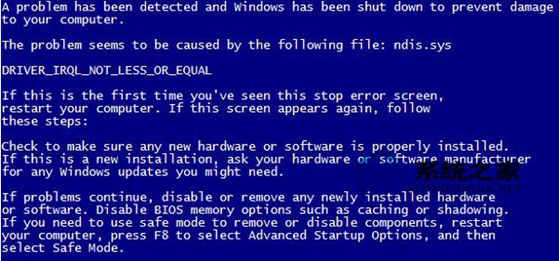
開關機藍畫面 BCCode 3b

若以上無效,執行 sfc /scannow 修復系統檔,或考慮修復安裝/重灌。

Copyright © Windows教程網 All Rights Reserved