Windows XP Windows 7 Windows 2003 Windows Vista Windows 綜合教學 Linux 系統教學
Windows 10 Windows 8 Windows 2008 Windows NT Windows Server 電腦軟體教學

Win7 莫名出現 Q: 磁碟機?Office 2010 Click-to-Run 虛擬磁碟移除法

編輯:Win7 系統應用技巧

Windows 7 安裝 Office 2010 Click-to-Run (線上安裝版) 後,系統多出一個無法存取的 Q: 磁碟機,為安裝程式建立的虛擬磁碟存放暫存檔。移除 Click-to-Run 元件即可消除。

成因說明

Office 2010 Click-to-Run 使用虛擬化技術,建立 Q: 虛擬磁碟掛載安裝檔案。解除安裝 Office 後虛擬磁碟不會自動移除,需單獨移除 Click-to-Run 執行元件。
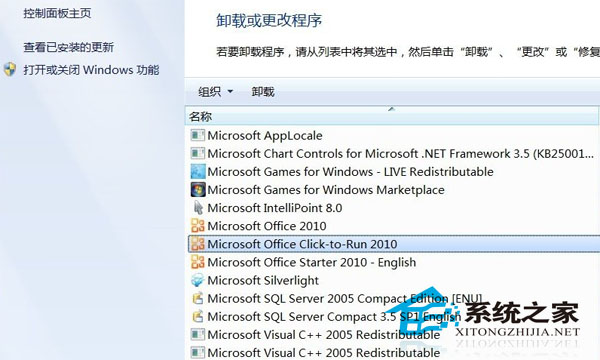
移除步驟

  1. 「控制台」→「程式與功能」 (或「新增/移除程式」)。
  2. 尋找 Microsoft Office Click-to-Run 2010 (Beta) 或類似名稱項目。
  3. 程式與功能移除 Click-to-Run

  4. 右鍵 →「解除安裝/變更」→ 完成移除。
  5. 重新開機,Q: 磁碟機消失。

建議替代方案

  • 改用 Office 2010/2013/2016/2019/365 量授權版 (MSI 安裝),不建立虛擬磁碟
  • 或直接下載 ISO 映像檔本地安裝,避免 Click-to-Run 相關問題
  • Office 2010 已停止支援,建議升級至受支援版本

Q: 磁碟機不佔用實體磁碟空間,但干擾磁碟機代號順序 (USB 插入變 R: 等),移除後磁碟機代號恢復正常序列。

Copyright © Windows教程網 All Rights Reserved