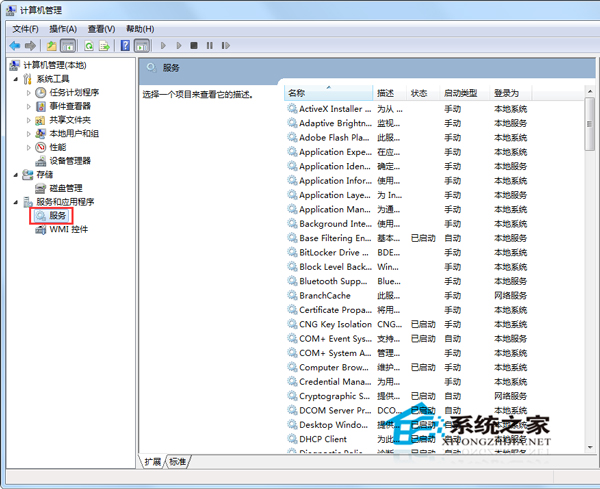
IIS (Internet Information Services) 作為本機網站伺服器,偶需重啟服務套用設定或回覆異常。Win7 透過「電腦管理」即可操作。
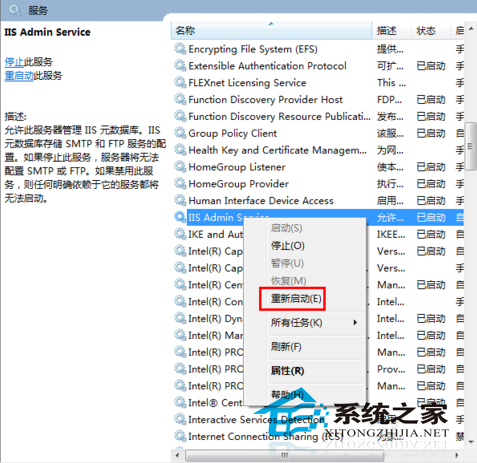
同樣適用於重啟「World Wide Web Publishing Service」等相關服務。若頻繁需重啟,可寫入批次檔:net stop iisadmin /y && net start w3svc。
Win7 開機出現「未能連接一個 Windows 服務」?重啟 System Event Notification 服務
Windows 7 切換雙顯示卡黑屏?重啟結束高負載程序、更新顯卡驅動
Win7 筆電無線網路頻繁斷線/受限?訊號強度、電源管理、驅動程式三大面向完整排查
Win7 系統 ARP 攻擊原理與分級防護方案:從內建防火牆到專業軟體
Win7 播放影片 CPU 佔用率過高?關閉 Windows Media Player 硬體加速降低資源消耗
Win7開機卡在「正在獲取網絡地址」?啟用DHCP服務+手動配IP雙管齊下