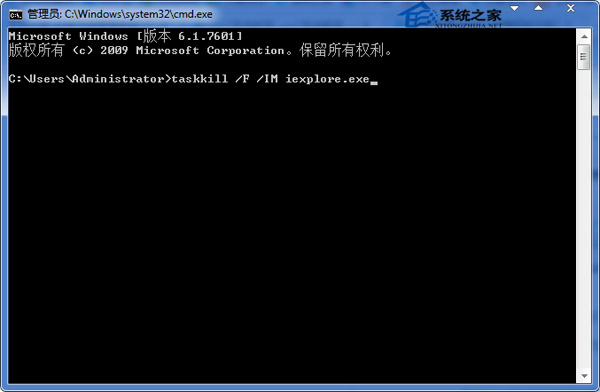
瀏覽器、下載工具常產生大量同名進程(如 iexplore.exe),逐一關閉極慢。命令列 taskkill 可依映像名稱強制批次結束。
taskkill
cmd
taskkill /F /IM iexplore.exe
參數說明:/F 強制終止、/IM 指定映像名稱。將 iexplore.exe 換成 chrome.exe、Thunder.exe 等同理。可寫成 .bat 檔雙擊執行。
/F
/IM
iexplore.exe
chrome.exe
Thunder.exe
關閉 Windows 7 影片預覽釋放資源:登錄檔一鍵停用特定格式縮圖
360問答頻繁彈出驗證碼無法登入?原因與解決辦法
Win7 裝置管理員顯示裝置驅動未安裝/顯示卡驅動不正常?Windows Update 自動更新全修復
Win7 查看寬頻上傳速度的三種實測方法
Win7 批次刪除多餘網路卡圖示,指令一鍵清理隱藏介面卡
Win7開機提示 hal.dll 損毀/遺失解決方案:修復 Boot.ini、重建引導、DOS/USB 修復實戰
Win7 C 槽拒絕存取?病毒破壞權限或非管理員帳戶,建立 Administrator 新帳戶解決
Win7 安裝程式出現錯誤 80070003?開啟防火牆即可解決