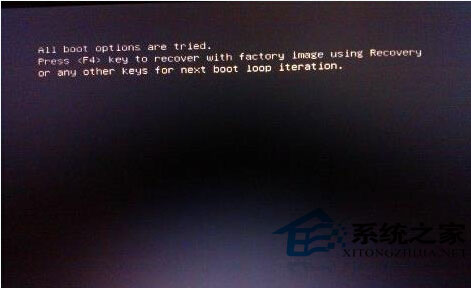
新裝 Win7 重啟出現黑屏 All boot options are tried,通常是 UEFI/BIOS 設定與安裝模式不匹配(如 UEFI 模式裝了 Legacy 系統)。進 BIOS 調整三項關鍵設定即可。
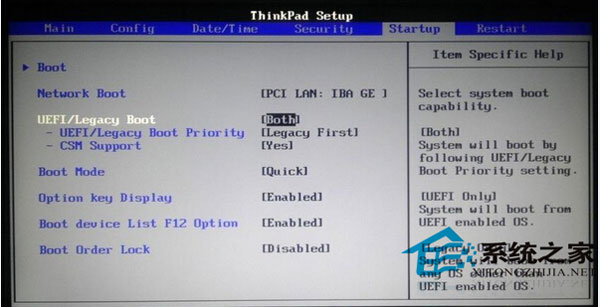
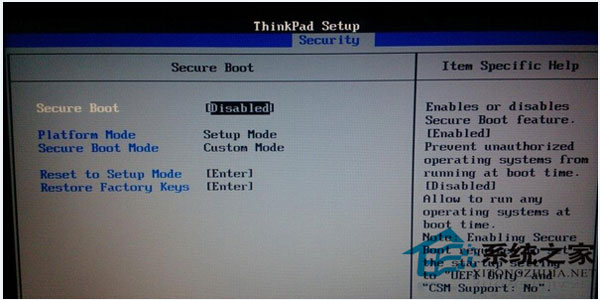
提醒:不同主機板 BIOS 介面術語略有差異,核心邏輯是:關閉 Secure Boot、啟用 CSM/Legacy 支援、優先從 UEFI 啟動。不確定時請找專業人員協助,切勿亂改他選項。
Win7 啟動英雄聯盟提示「遊戲環境異常」?卸載所有安全軟體(360/QQ管家)重開機即可解決
Win7 取消視窗拖曳至螢幕邊緣自動最大化 (Aero Snap):滑鼠設定防止視窗自動排列
怎麼刪除電腦多餘的啟動項/系統選單?msconfig 一鍵搞定,不重裝系統
Epson XP-100 印表機如何多台電腦共用?無線網路共享 vs USB 切換器
IE11 升級通知在 Win7 開啟「唐僧模式」?微軟終止支援背景與應對策略
Win7 瀏覽網頁提示「僅顯示安全內容」怎麼辦?IE 安全性設定調整混合內容顯示