Windows XP Windows 7 Windows 2003 Windows Vista Windows 綜合教學 Linux 系統教學
Windows 10 Windows 8 Windows 2008 Windows NT Windows Server 電腦軟體教學

Win7 光碟機讀得到資訊卻打不開光碟?修改登錄 StagingPath 恢復燒錄暫存路徑

編輯:Win7 系統應用技巧

光碟機能讀取資訊但無法開啟/燒錄,常因登錄 CD Burning 區塊的 StagingPath 指向無效路徑。修正為有效暫存資料夾即可恢復功能。

修正步驟

  1. Win + R → regedit。
  2. 定位至:
    HKEY_CURRENT_USER\Software\Microsoft\Windows\CurrentVersion\Explorer\CD Burning\StagingInfo\Volume\{...806e6f6e6963}
  3. 右側 StagingPath 雙擊修改為有效路徑(預設 C:\Users\你的帳號\AppData\Local\Microsoft\Windows\Burn\Burn)。
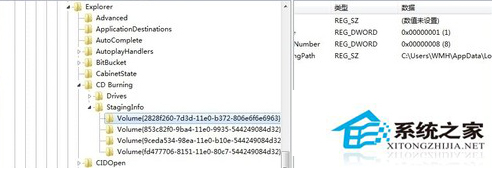
  4. 確定關閉登錄編輯器,重新插入光碟測試。

登錄 CD Burning StagingPath

若連光碟資訊都讀不到,請檢查光碟機硬體或驅動程式。

Copyright © Windows教程網 All Rights Reserved