Windows XP Windows 7 Windows 2003 Windows Vista Windows 綜合教學 Linux 系統教學
Windows 10 Windows 8 Windows 2008 Windows NT Windows Server 電腦軟體教學

Win7 使用命令提示字元關閉檔案開啟時的安全性警告

編輯:Win7 系統應用技巧

Windows 7 開啟未知來源執行檔 (.exe、.bat、.vbs 等) 時會彈出安全性警告。若確定檔案安全,可透過命令修改登錄檔關閉特定副檔名的警告。

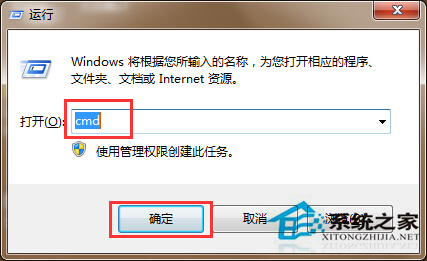
  1. 按 Win + R 輸入 cmd 開啟命令提示字元。
  2. 命令提示字元視窗
  3. 輸入以下指令並按 Enter:
    reg add HKCU\Software\Microsoft\Windows\CurrentVersion\Policies\Associations /v ModRiskFileTypes /t REG_SZ /d ".exe;.bat;.vbs" /f
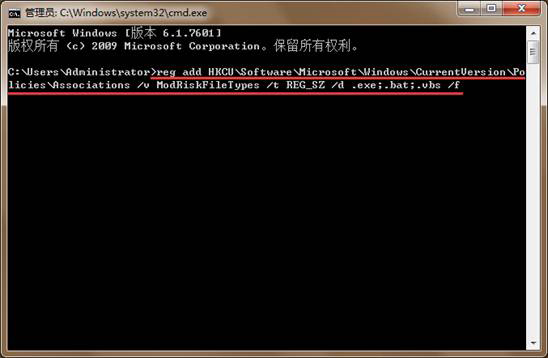
  4. 執行 reg add 指令
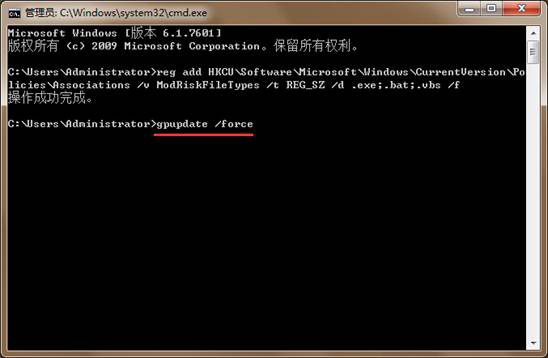
  5. 提示「操作成功」後,輸入 gpupdate /force 強制更新群組原則。
  6. 執行 gpupdate /force
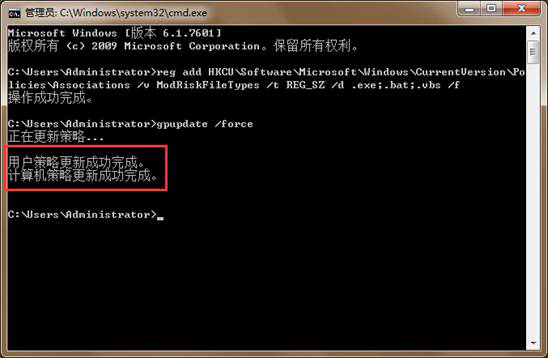
  7. 看到「電腦原則更新成功完成」即可關閉視窗。
  8. 群組原則更新成功

設定生效後,指定副檔名的檔案開啟將不再彈出警告。注意:這會降低安全防護,請確信來源可靠再使用。

Copyright © Windows教程網 All Rights Reserved