若偏好乾淨桌面,可透過登錄檔隱藏所有桌面圖示(包含電腦、回收站、網路等)。此法不刪除圖示,僅隱藏顯示,需時可再改回。
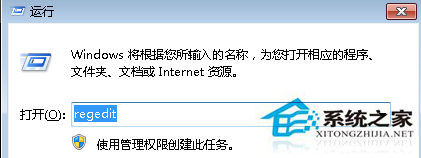
regedit
HKEY_USERS\.DEFAULT\Software\Microsoft\Windows\CurrentVersion\Explorer
NoDesktop
1
替代法:桌面右鍵 → 「檢視」 → 取消勾選「顯示桌面圖示」,效果相同且更簡單,無需改登錄檔。
Win7 刪除本地瀏覽記錄(輸入網址歷史)?登錄表清除 TypedPaths 鍵值
Win7 PowerPoint 簡報另存為影片 (MP4/WMV) 完整教學
Windows 7 發現隱藏後台程序:msinfo32 系統資訊揭露工作管理員看不到的進程
Win7 刪除 Everyone 權限提升共用資料夾安全性
「我的電腦」無法開啟?木馬修改登錄/感染 explorer.exe 致病
Win7 將「電腦」加入工作列:建立捷徑鎖定法
Win7 進入安全模式三大方法:F8、Ctrl、系統設定全解析
Win7 解決 c:\windows\temp\*.tmp 檔案損毀無法讀取的快速清理法