瀏覽器顯示錯誤代碼 118 (DNS 解析失敗) 時,可透過命令提示字元重設 TCP/IP 與 DNS 快取來修復。
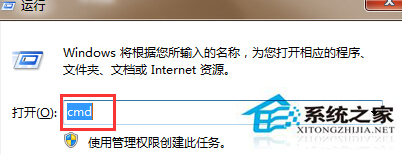
cmd
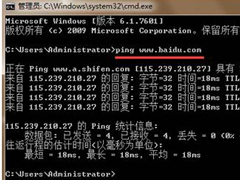
ping www.baidu.com
ipconfig /flushdns
netsh int ip reset
執行完成後重新開機,網路連線應恢復正常。
一體機清灰太難?建議送售後或找專業師傅,別強拆斷卡扣
Win7 硬體加速選項灰色無法勾選怎麼辦?替換顯卡全加速 DLL 檔修復
Windows 7 實戰安全指南:從帳戶控制到家長控制,打造多層防護
雙路服務器玩《英雄聯盟》易掉線?網絡拓撲/路由策略/服務器架構深度解析
Win7 開機自動彈出撥號連線視窗怎麼關閉?兩種方法徹底解決
Win7 區域網路跨網段共享印表機:修改 hosts + 啟用 NetBIOS over TCP/IP 完整教學
Windows 7 備份與還原完整指南:系統映像、修復光碟、排程備份一站式掌握
Win7 純淨版 Excel 2007 尋找/取代資料完整教學:查找選項與範圍設定